
Problem
I had troubles trying to use git LFS, despite the many suggestions here on SO, on Git and GitHub's documentation, and on some Gists I'd run across.
My problem was as follows:
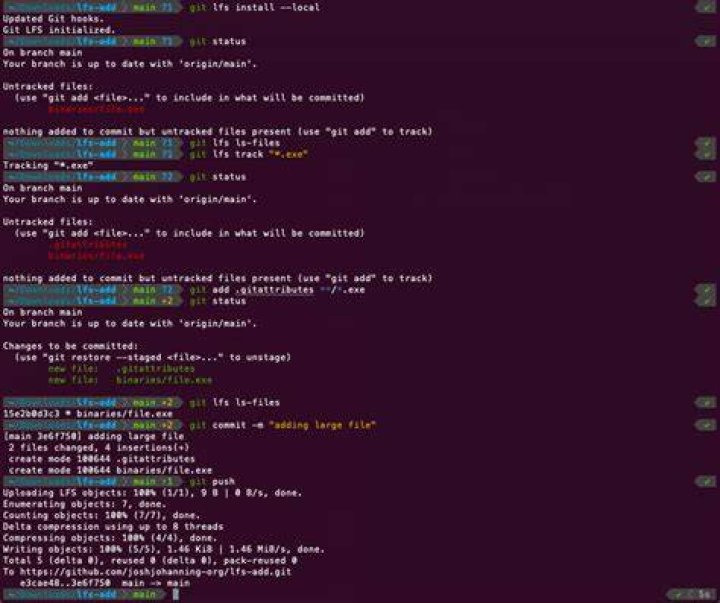
After performing the necessary steps:
git lfs install git lfs track "<file of interest>" git commit I would still not have any files being tracked. If I performed
git lfs ls-files it would be blank. If I went ahead & performed the push, the transaction would fail, saying that the files are too large. (As expected, but I was desperate.)
34 Answers
My (Original Poster) "Solution"
I then discovered a few fixes, some of which seem to be bugs, some of which simply were not obvious to me.
It seems that in order to use
lfswith an existing repository, a hack or third party tool such as BFG's converter is needed.- I did not want to go that route, so I simply initialized a new repository locally, then did the challenge of hooking it back up to the real repo.
- I created a new directory, then
git init, etc.- In my case, the remote repository was GitHub. So I did all those proper hookups like
git remote add origin :<my_id>/<my_repo>.git
- In my case, the remote repository was GitHub. So I did all those proper hookups like
Also, while Git's Training Video claims that you can simply specify a folder, such as
"my_folder/", I could not get this to work. Therefore, I just cleverly used filename extensions to manage things.- For example,
git lfs track "my_folder/"would not work for me, butgit lfs track "*.zip"did work.
- For example,
I had no luck getting LFS files to be identified correctly unless I had first updated the
.gitattributesfile, and committed and pushed that new file to the remote server.git lfs track "*.zip"git add .gitattributesgit commit -m "Updated the attributes"git pushgit add my_large_file.zipgit lfs ls-files- And here I would ensure that I saw
my_large_file.zipbeing tracked.
- And here I would ensure that I saw
git commit -m "Now I am adding the large file"git push
It's possible that some of the things work, and I was simply doing them wrong. However, following the witchcraft described above finally got LFS to work, so I thought I'd pass on these details for others, in case someone else had the same problem.
7To track all files and sub directories of my_folder via LFS, you can do:
git lfs track "my_folder/**" It worked for me.
Doing the following is not working as of now to track whole my_folder directory:
git lfs track "my_folder/" is not working
4To put files on an existing repo on lfs you can also do:
git lfs migrate import --include="*.mp3,*.pth" (Replace .mp3 and .pth with the file extension you wish to put on lfs)
As suggested in the comments by @Ravin Sardal, all I had to do to fix the issue was to run
git lfs install in the base directory of the repository to setup large file support. After that
git lfs track "<file of interest>" worked as expected and indeed git lfs ls-files listed the tracked files before the commit.




