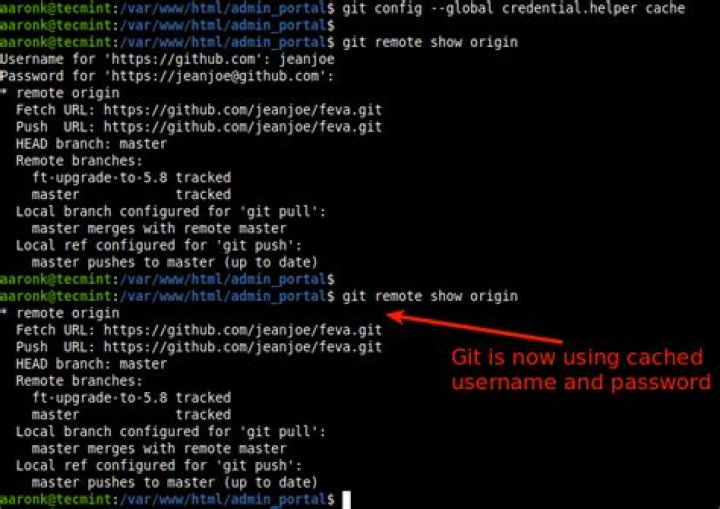
I followed these instructions to the letter, including the part about password caching. It seems like the instructions are wrong, because every time I git push origin master I get this error:
git: 'credential-cache' is not a git command. See 'get --help'. ... at which point I am forced to enter my username and password. After doing so, I am presented with the same error message again, followed by the output from git push.
Here is the contents of my .gitconfig file:
[user] name = myusername email = [credential] helper = cache To be clear, after I installed Git and ran Git Bash, here is exactly what I typed:
git config --global user.name "myusername" git config --global user.email "" git config --global credential.helper cache Please help. This is so frustrating!
621 Answers
From a blog I found:
This [git-credential-cache] doesn’t work for Windows systems as git-credential-cache communicates through a Unix socket.
Git for Windows
Since msysgit has been superseded by Git for Windows, using Git for Windows is now the easiest option. Some versions of the Git for Windows installer (e.g. 2.7.4) have a checkbox during the install to enable the Git Credential Manager. Here is a screenshot:
Still using msysgit? For msysgit versions 1.8.1 and above
The wincred helper was added in msysgit 1.8.1. Use it as follows:
git config --global credential.helper wincred For msysgit versions older than 1.8.1
First, download git-credential-winstore and install it in your git bin directory.
Next, make sure that the directory containing git.cmd is in your Path environment variable. The default directory for this is C:\Program Files (x86)\Git\cmd on a 64-bit system or C:\Program Files\Git\cmd on a 32-bit system. An easy way to test this is to launch a command prompt and type git. If you don't get a list of git commands, then it's not set up correctly.
Finally, launch a command prompt and type:
git config --global credential.helper winstore Or you can edit your .gitconfig file manually:
[credential] helper = winstore Once you've done this, you can manage your git credentials through Windows Credential Manager which you can pull up via the Windows Control Panel.
13Looks like git now comes with wincred out-of-the-box on Windows (msysgit):
git config --global credential.helper wincred - Run
git config --global credential.helper wincred - Go to:
CONTROL PANEL\CREDENTIAL MANAGER\WINDOWS CREDENTIAL\GENERIC CREDENTIAL - Click in add a credential in
Internet or network address:addgit:https://{username}.github.com
User:{name}
Password:{Password}
I faced this problem while using AptanaStudio3 on windows7. This helped me:
git config --global credential.helper wincred For git version >=1.7.10 (check with git --version), use this method (from reference):
Windows:
git config --global credential.helper wincred Mac:
git config --global credential.helper osxkeychain A similar error is 'credential-wincred' is not a git command
The accepted and popular answers are now out of date...
wincredis for the project git-credential-winstore which is no longer maintained.It was replaced by Git-Credential-Manager-for-Windows maintained by Microsoft open source.
Download the release as zip file from link above and extract contents to
\cygwin\usr\libexec\git-core (or \cygwin64\usr\libexec\git-core as it may be)
Then enable it, (by setting the global .gitconfig) - execute:
git config --global credential.helper manager How to use
No further config is needed.
It works [automatically] when credentials are needed.
For example, when pushing to Azure DevOps, it opens a window and initializes an oauth2 flow to get your token.
ref:
1There is now a much easier way to setup Git password caching by double clicking a small exe on Windows. The program is still based on git-credential-winstore mentioned by the top voted answer, although the project has been moved from GitHub to
You can download the exe (and a binary for Mac) from this blog post:
1I fixed this issue by removing the credential section from the config of specific project:
- Just typed:
git config -e - Inside the editor I removed the whole section
[credential] helper = cache.
This removed the annoying message :
git: 'credential-cache' is not a git command. See 'git --help'.
For the sake of others who come on this issue, I had this same problem in Ubuntu (namely that my passwords weren't caching, despite having set the option correctly, and getting the error git: 'credential-cache' is not a git command.), until I found out that this feature is only available in Git 1.7.9 and above.
Being on an older distribution of Ubuntu (Natty; I'm a stubborn Gnome 2 user) the version in the repo was git version 1.7.4.1. I used the following PPA to upgrade:
2For the sake of others having this issue - I landed here because I tried to get cute with how I set up a new github repository, but per the setup page credential helper doesn't work unless you clone a repository.
"Tip: The credential helper only works when you clone an HTTPS repository URL. If you use the SSH repository URL instead, SSH keys are used for authentication. This guide offers help generating and using an SSH key pair."
I was also getting similar error when I tried to use command "git pull" from master branch.
Error: "git: 'credential-manager' is not a git command. See 'git --help'." I executed below two commands and issue got resolved.
$ git config --global --unset credential.helper $ git config credential.helper store I realize I'm a little late to the conversation, but I encountered the exact same issue In my git config I had two entries credentials…
In my .gitconfig file
[credential] helper = cached [credentials] helper = wincred The Fix: Changed my .gitconfig file to the settings below
[credential] helper = wincred [credentials] helper = wincred On an older Ubuntu Linux system:
git config --global credential.helper store I literally just went through this!
- Download Git Credential Manager Core and Install it:
- Go to the
Account Settings > Emailson GitHub. Your should see something like this:
- The highlighted email is system generated to keep your private email private. Now copy that and use it in the next step
- Configure git:
git config --global user.name "yourusername" git config --global user.email "" git config --global credential.helper cache Now, your git commands should work again.
Minor note: I'm using Linux Mint. YMMV
Additional note: There is a bug in Git Credential Manager Core v 2.0.567 in their Debian backage. Please install v2.0.474 before the new version is out.
1Another efficient workaround is:
1- Go to control panel and add your credentials for github.com like this:
2- go to CMD and enter these commands:
- a- cd %localappdata%\Atlassian\SourceTree\git_local\mingw32\bin\
- b- git.exe config --edit --system
- c- correct last line with: helper = manager
- d- Save the new config file by clicking on CTRL+C then typing :wq then hit Enter
This works perfectly for me!
I had three different helper= entries in my .gitconfig's [credential] section, one of them empty. Deleting the other two and keeping helper=wincred solved the problem for me.
BTW: I don't know why, but I didn't find my .gitconfig right away. I found it then in C:\Users\username.
This worked for me:
git credential-manager-core configure1
We had the same issue with our Azure DevOps repositories after our domain changed, i.e. from @xy.com to @xyz.com. To fix this issue, we generated a fresh personal access token with the following permissions:
Code: read & write Packaging: read
Then we opened the Windows Credential Manager, added a new generic windows credential with the following details:
Internet or network address: "git:{projectname}@projectname}" - alternatively you should use your git repository name here.
User name: "Personal Access Token"
Password: {The generated Personal Access Token}
Afterwards all our git operations were working again. Hope this helps someone else!
On mac run following command:
git config --global credential.helper osxkeychain
My original answer turned out to not be very useful even for myself, so I looked a bit more into it, and I found a hack (albeit somewhat complicated).
So, I use git under MSYS2, and I would like to use credential-cache, to just remember my password temporarily (and I haven't seen such a use case with wincred or other Windows-applicable approaches).
Basically, this requires a hack in - instead of die-ing in that line, we'd like to proceed.
So, first of all, we want to build git under MSYS2.
- Problem 1: You cannot just build the proper under MSYS2, linking stage will fail with "src/git/cache.h:1262: undefined reference to `win32_has_dos_drive_prefix'" and similar messages
So, we need to build the actual git as used in MSYS2. First, check versions:
$ git --version git version 2.33.0 $ pacman -Ss git | grep installed # msys/git 2.33.0-1 (VCS) [installed] Then, as per , we can do this:
$ git clone "" $ cd MSYS2-packages/ $ cd git $ makepkg -sCLf ==> Making package: git 2.33.0-1 (Thu, Sep 23, 2021 12:47:33 PM) ==> Checking runtime dependencies... ==> Checking buildtime dependencies... ==> Installing missing dependencies... ... make[1]: Entering directory '/c/src/MSYS2-packages/git/src/git-2.33.0' make[1]: 'GIT-VERSION-FILE' is up to date. make[1]: Leaving directory '/c/src/MSYS2-packages/git/src/git-2.33.0' sed -e '1s|#!.*/sh|#!/bin/sh|' git-subtree.sh >git-subtree chmod +x git-subtree make: Leaving directory '/c/src/MSYS2-packages/git/src/git-2.33.0/contrib/subtree' ==> Starting check()... Note here:
- This build process first ends up in a ASCIIDOC/XMLTO part, which like takes half an hour on my machine
- Then it ends up in a
*** prove ***part which takes even longer, but can be interrupted with Ctrl-C, and the built executables will not be erased.
So, now we want to do a hack in the source; note:
- If we do a hack in the source, we do NOT want to use
makepkg -sCLf, because that will erase the source directory (along with all the built .exe artefacts), and then reconstruct it before build
So, we make our hack with sed, and then build:
$ sed -i 's/die(_(permissions_advice), dir);/fprintf(stderr, "Permissions on cached credentials socket directory %s are too loose, but HACK: going on\\n", dir);/' ./src/git-2.33.0/builtin/credential-cache--daemon.c $ (cd src/git-2.33.0/; make) CC builtin/credential-cache--daemon.o LINK git.exe ... SUBDIR templates At this point, note that the hack ends up in at least three executables, which can be confirmed with:
$ grep -ao ....HACK........ ./src/git-2.33.0/git-credential-cache--daemon.exe $ grep -ao ....HACK........ ./src/git-2.33.0/git-credential-cache.exe $ grep -ao ....HACK........ ./src/git-2.33.0/git.exe ... and I could only get this to work, after replacing all three:
# backup the original files: $ mv /usr/lib/git-core/git-credential-cache--daemon.exe /usr/lib/git-core/__git-credential-cache--daemon_orig.exe $ mv -v /usr/lib/git-core/git-credential-cache.exe /usr/lib/git-core/__git-credential-cache__orig.exe $ mv -v /usr/bin/git.exe /usr/bin/__git_orig.exe $ mv -v /usr/lib/git-core/git.exe /usr/lib/git-core/__git_orig.exe # copy over the hacked files: cp -v ./src/git-2.33.0/git-credential-cache--daemon.exe /usr/lib/git-core/ cp -v ./src/git-2.33.0/git-credential-cache.exe /usr/lib/git-core/ cp -v ./src/git-2.33.0/git.exe /usr/bin/ cp -v ./src/git-2.33.0/git.exe /usr/lib/git-core/ And at this point, credential-cache started working also for me on MSYS2 (caching passwords for a limited amount of time); it's just that it dumps the hacked line when starting up:
$ git pull Password for ' Permissions on cached credentials socket directory /home/user/.cache/git/credential are too loose, but HACK: going on Already up to date. # second pull, password is cached $ git pull Already up to date. A bit tricky, but seems to work.
PS: A tricky thing was, that I originally replaced die with just a printf to stdout, but that kept on failing; it turns out, stdout is used for interprocess communication, and for this to succeed, something apparently answers ok\0 on stdout which is three bytes; so the solution was to print the notice to stderr instead.
(original answer):
While not responsive to the question exactly as asked, this was the most appropriate question I could find, to document this as an answer:
I use git under MSYS2 in Windows 10, which currently has the version:
$ git --version git version 2.32.0 I typically just want git to cache my password for a limited time (maybe 10 minutes or so) and then forget about it; and I haven't yet seen uses of wincred or other Windows-specific credential manager with that use case.
That being said, turns out for me there is an "easy fix" - basically, the first time credential manager runs, it is fine; it is only upon subsequent uses that I get:
$ git push Password for ' fatal: The permissions on your socket directory are too loose; other users may be able to read your cached credentials. Consider running: chmod 0700 /home/user/.cache/git/credential fatal: cache daemon did not start: Enumerating objects: 8, done. Counting objects: 100% (8/8), done. ... So, basically, the fix is to delete the credential directory - thereafter, the credential cache manager runs as if for the first time, and caches the passwords for a limited time - just as I want it:
$ rm -rf ~/.cache/git/credential # note below, the very first pull still asks for a password: $ git pull Password for ' Already up to date. # ... but the second pull does not, it uses credentials cache $ git pull Already up to date. Good enough for me, I guess :)
EDIT: not really, I've experienced that immediately after this, if you try a pull in another tab, the error returns.
The current packaged credential helper with Git for Windows (2.32, Q2 2021), is
git config credential.helper manager-core where git-credential-manager-core C:\Program Files\Git\mingw64\libexec\git-core\git-credential-manager-core.exe This is after GCM-core (Git Credential Manager Core): microsoft/Git-Credential-Manager-Core/
Git Credential Manager Core (GCM Core) is a secure Git credential helper built on .NET that runs on Windows and macOS. Linux support is in an early preview.
Compared to Git's built-in credential helpers (Windows: wincred, macOS: osxkeychain, Linux: gnome-keyring) which provides single-factor authentication support working on any HTTP-enabled Git repository, GCM Core provides multi-factor authentication support for Azure DevOps, Azure DevOps Server (formerly Team Foundation Server), GitHub, and Bitbucket.
Git Credential Manager Core (GCM Core) replaces the .NET Framework-based Git Credential Manager for Windows (GCM), and the Java-based Git Credential Manager for Mac and Linux (Java GCM), providing a consistent authentication experience across all platforms.
With Git 2.34 (Q4 2021), unix socket start to be considered for Git for Windows:
See commit bb390b1, commit 245670c, commit 0fdcfa2 (14 Sep 2021) by Carlo Marcelo Arenas Belón (carenas).
(Merged by Junio C Hamano -- gitster -- in commit c2e7990, 23 Sep 2021)
git-compat-util: include declaration for unix sockets in windowsSigned-off-by: Carlo Marcelo Arenas Belón
Available since Windows 10 release 1803 and Windows Server 2019.
NO_UNIX_SOCKETSis still the default for Windows builds, as they need to keep backward compatibility with releases up to Windows 7, but allow including the header otherwise.