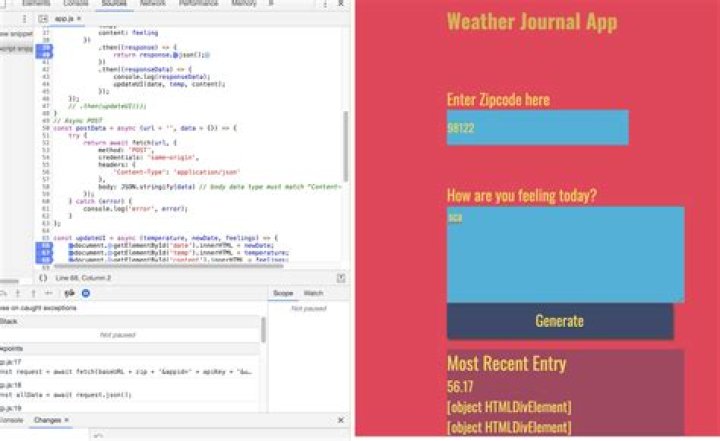

I want to just create a copy of original divs inside of a new div with one case -
Case 1 : copy those divs which are having favourite classes inside of a new div of id fav_items.
I have already tried -
I tried both innerHTML and appendChild() method .
When I tried innerHTML then it gave [object HTMLDivElement] instead of real content .
and When I tried appendChild() method then it moves the div from it's original position to a new div.
Code :
HTML
<div> <div> <p>Item 1.</p> <div> <div> <p>Item 2.</p> <div> <div> <p>Item 3.</p> <div> </div> <!-- Favourite Added items----------> <div> <h2>Your items :</h2> </div>
Javascript uses innerHTML
var cart_div = document.getElementById("cart_items"); var fav_items = document.getElementsByClassName("favorite"); for(let i = 0; i< fav_items.length; i++){ cart_div.innerHTML += fav_items[i]; }
Javascript uses appendChild()
var cart_div = document.getElementById("cart_items"); var fav_items = document.getElementsByClassName("favourite"); for(let i = 0; i< fav_items.length; i++){ cart_div.appendChild(fav_items[i]); } But when I use appendChild() method then it moves the div of class favourite from it's original position to a new div of id cart_items.
Code preview using innerHTML
var cart_div = document.getElementById("cart_items"); var fav_items = document.getElementsByClassName("favourite"); for(let i = 0; i< fav_items.length; i++){ cart_div.innerHTML += fav_items[i]; }<div> <div> <p>Item 1.</p> <div> <div> <p>Item 2.</p> <div> <div> <p>Item 3.</p> <div> </div> <!-- Favourite Added items----------> <div> <h2>Your items :</h2> </div> Code preview using appendChild()
var cart_div = document.getElementById("cart_items"); var fav_items = document.getElementsByClassName("favorite"); for(let i = 0; i< fav_items.length; i++){ cart_div.appendChild(fav_items[i]); }<div> <div> <p>Item 1.</p> <div> <div> <p>Item 2.</p> <div> <div> <p>Item 3.</p> <div> </div> <!-- Favourite Added items----------> <div> <h2>Your items :</h2> </div>So how can I show the div of class favourite to the div of id cart_items ?
3 Answers
var cart_div = document.getElementById("cart_items"); var fav_items = document.getElementsByClassName("favourite"); for(let i = 0; i< fav_items.length; i++){ cart_div.innerHTML += fav_items[i].innerHTML; } I think by adding innerHTML to the fav_items you'll get what's inside. Also you had a typo with classname 'favorite' instead of 'favourite'.
4Try .outerHTML instead of .innerHTML ,
var cart_div = document.getElementById("cart_items"); var fav_items = document.getElementsByClassName("favourite"); for(let i = 0; i< fav_items.length; i++){ cart_div.innerHTML += fav_items[i].outerHTML; } Setting innerHTML expects you to write raw HTML, so it won't work with a list of DOM objects - which is what is indicated by [object HTMLDivElement].
appendChild is a better option, but you need to duplicate the existing nodes (possibly with cloneNode() or another similar DOM method).




