I have an IP address of a Guest virtual machine running on an VMware ESXi host. I don't know the IP address of this VMware host.
How can I find the IP address of this VMware host?
- I have vSphere client software installed on my system.
- I can ping the IP of the guest machine and it replies. Thanks.
5 Answers
If you really only have the guest’s IP address, you generally cannot obtain the host’s IP address. There may be some configurations where it could work, though.
From your (PC’s) perspective, the virtual machine is just another network-accessible computer. Even in the guest’s local network (broadcast domain), a VM cannot be distinguished from a real PC physically connected to a switch just by looking at its IP address and the way traffic takes to get there.
4If you have the vsphere client, you can open the console of a guest machine and the title bar will show you which host you are connected to: 
You can see in the example above that the XA_StreamDev is on a host (with its name faded out). If you ping that host name, you will be able to get its ip address.
To open the full console, right click your VM and select "Open Console".
Also, if you go to VCenter > Hosts & Clusters > you will be able to see a list of hosts - which again, you should be able to ping.
2Theoretically, you may find that ESXi host can't be accessed because its IP address is beyond your scope.
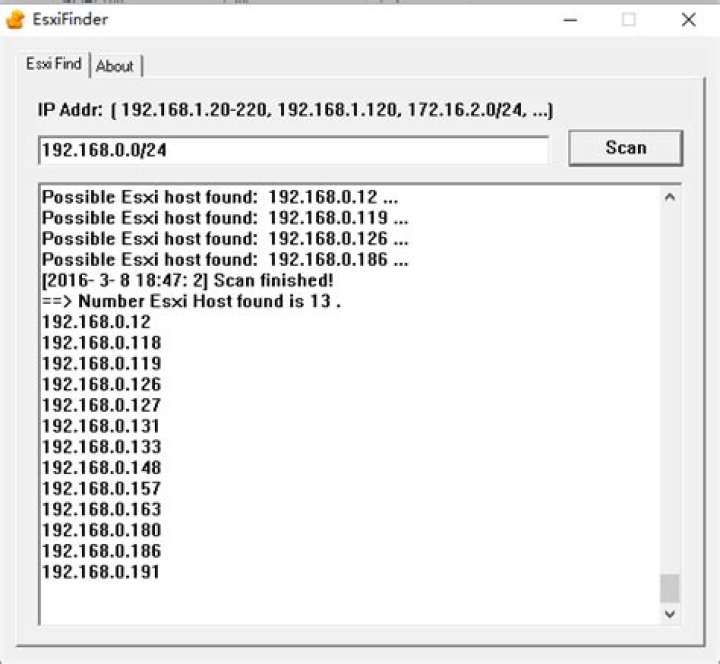
But if you know its IP address range which you can access, the following tools ("ESXi host finder") can help you to find which one is the possible ESXi host:
Yes you can.
With my vSphere client 5.5, I can enter Advanced search (right top corner) to add VM IP as search field.
EDIT:
Sorry that I overlooked the OP; but if you find the vm, you can see its host, naturally.....
You can open the VM, check the summary part, and there you have the IP of host.
cat /etc/vmware/esx.conf | grep "/adv/Misc/HostIPAddr" | awk -F ' = ' '{gsub("\"", "");print $2}' The IP is configured in the file cat '/etc/vmware/esx.conf' under the key /adv/Misc/HostIPAddr
The cat command captures the whole configuration file, the ouput is piped to grep
The grep command filters out all input except the line containing the key we want, the whole line is piped to awk
awk splits the line by the '=' character and grabs the IP on the second column, the 'gsub' awk subcommand removes the double quotes.
1



