I have excel columns like this "5680 Konkel St Detroit 48210 (42.3270550004, -83.1107549997)" I just want to extract the lat longs. normally I would do a =right(a2,30) but the lat longs are different lengths so it doesnt work
13 Answers
For lats (the first number in the comma delimited numbers.)
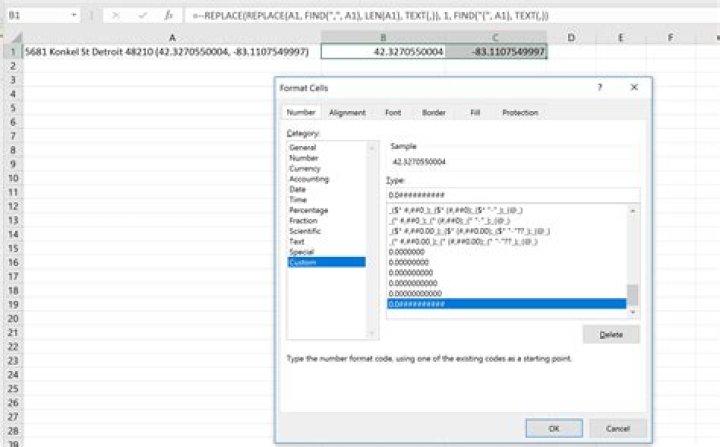
=--REPLACE(REPLACE(A1, FIND(",", A1), LEN(A1), TEXT(,)), 1, FIND("(", A1), TEXT(,)) For longs (the last number in the comma delimited numbers.)
=--REPLACE(LEFT(A1, LEN(A1)-1),1,FIND(",",A1)+1,TEXT(,)) Custom Number Formatted as 0.0##########. In the image below note the right-aligned true numbers.

One longer formula:
=--TRIM(MID(SUBSTITUTE(SUBSTITUTE(MID($A$1,FIND("(",$A$1)+1,LEN($A$1)),")",""),",",REPT(" ",999)),(COLUMN(A:A)-1)*999+1,999)) Put this in B1 and copy over to C1.
Then format as desired.
If I understand you well, each cell in column A contains a text such as: "5680 Konkel St Detroit 48210 (42.3270550004, -83.1107549997)" and you want to extract the two numbers in parentheses.
I would advice you to NOT use the formulas suggested by the others, as their formulas are convoluted and hard to maintain. If you want to understand what you are doing, please do it in steps by utilizing extra columns (which you can hide afterwards if you want) as follows.:
On column B, in cell B1 enter the formula =FIND( "(", A1 ).
This will return an integer, which is the position of the character "(" in your original text in cell A1.
Then on column C, in cell C1 enter =FIND( ",", B1 ), where we use the previous value returned in B1 as the start index, since we know "," is located after "("
On column D, in cell D1 enter =MID( A1, B1+1, C1-B1), which will give you the first number.
Then on column E, in cell E1 enter =FIND( ")", C1 ), where we use C1 as the start index since we know ")" is located after ","
Finally on column F, in cell F1 enter =MID( A1, C1+2, E1-C1-1), which will give you the second number.