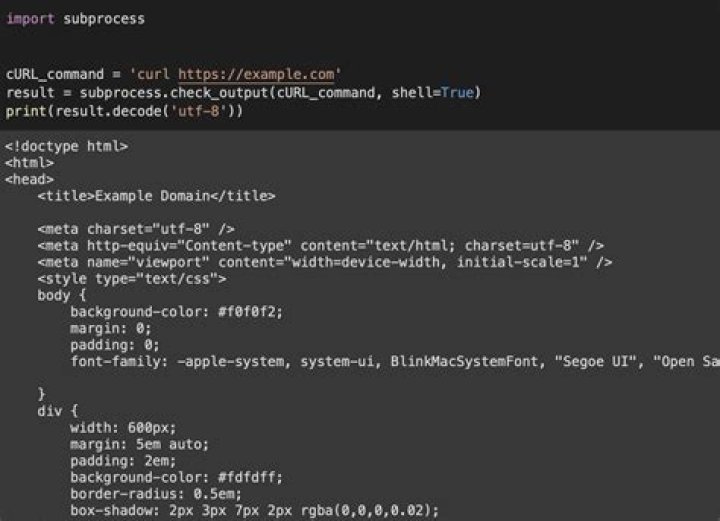

I am trying to execute a curl command within a python script.
If I do it in the terminal, it looks like this:
curl -X POST -d '{"nw_src": "10.0.0.1/32", "nw_dst": "10.0.0.2/32", "nw_proto": "ICMP", "actions": "ALLOW", "priority": "10"}' I've seen recommendations to use pycurl, but I couldn't figure out how to apply it to mine.
I tried using:
subprocess.call([ 'curl', '-X', 'POST', '-d', flow_x, ' ]) and it works, but is there a better way?
28 Answers
Don't!
I know, that's the "answer" nobody wants. But if something's worth doing, it's worth doing right, right?
This seeming like a good idea probably stems from a fairly wide misconception that shell commands such as curl are anything other than programs themselves.
So what you're asking is "how do I run this other program, from within my program, just to make a measly little web request?". That's crazy, there's got to be a better way right?
Uxio's answer works, sure. But it hardly looks very Pythonic, does it? That's a lot of work just for one little request. Python's supposed to be about flying! Anyone writing that is probably wishing they just call'd curl!
it works, but is there a better way?
Yes, there is a better way!
Requests: HTTP for Humans
Things shouldn’t be this way. Not in Python.
Let's GET this page:
import requests res = requests.get(') That's it, really! You then have the raw res.text, or res.json() output, the res.headers, etc.
You can see the docs (linked above) for details of setting all the options, since I imagine OP has moved on by now, and you - the reader now - likely need different ones.
But, for example, it's as simple as:
url = ' payload = { 'key' : 'val' } headers = {} res = requests.post(url, data=payload, headers=headers) You can even use a nice Python dict to supply the query string in a GET request with params={}.
Simple and elegant. Keep calm, and fly on.
14You could use urllib as @roippi said:
import urllib2 data = '{"nw_src": "10.0.0.1/32", "nw_dst": "10.0.0.2/32", "nw_proto": "ICMP", "actions": "ALLOW", "priority": "10"}' url = ' req = urllib2.Request(url, data, {'Content-Type': 'application/json'}) f = urllib2.urlopen(req) for x in f: print(x) f.close() Use this tool (hosted here for free) to convert your curl command to equivalent Python requests code:
Example: This,
curl ' -H 'Connection: keep-alive' -H 'Cache-Control: max-age=0' -H 'Origin: -H 'Accept-Encoding: gzip, deflate, br' -H 'Cookie: SESSID=ABCDEF' --data-binary 'Pathfinder' --compressed Gets converted neatly to:
import requests cookies = { 'SESSID': 'ABCDEF', } headers = { 'Connection': 'keep-alive', 'Cache-Control': 'max-age=0', 'Origin': ' 'Accept-Encoding': 'gzip, deflate, br', } data = 'Pathfinder' response = requests.post(' headers=headers, cookies=cookies, data=data) If you are not tweaking the curl command too much you can also go and call the curl command directly
import shlex cmd = '''curl -X POST -d '{"nw_src": "10.0.0.1/32", "nw_dst": "10.0.0.2/32", "nw_proto": "ICMP", "actions": "ALLOW", "priority": "10"}' args = shlex.split(cmd) process = subprocess.Popen(args, shell=False, stdout=subprocess.PIPE, stderr=subprocess.PIPE) stdout, stderr = process.communicate() Try with subprocess
CurlUrl="curl ' -H 'Connection: keep-alive' -H 'Cache- Control: max-age=0' -H 'Origin: -H 'Accept-Encoding: gzip, deflate, br' -H 'Cookie: SESSID=ABCDEF' --data-binary 'Pathfinder' -- compressed" Use getstatusoutput to store the results
status, output = subprocess.getstatusoutput(CurlUrl) You can use below code snippet
import shlex import subprocess import json def call_curl(curl): args = shlex.split(curl) process = subprocess.Popen(args, shell=False, stdout=subprocess.PIPE, stderr=subprocess.PIPE) stdout, stderr = process.communicate() return json.loads(stdout.decode('utf-8')) if __name__ == '__main__': curl = '''curl - X POST - d '{"nw_src": "10.0.0.1/32", "nw_dst": "10.0.0.2/32", "nw_proto": "ICMP", "actions": "ALLOW", "priority": "10"}' http: // localhost: 8080 / firewall / rules / 0000000000000001 ''' output = call_curl(curl) print(output) Rephrasing one of the answers in this post, instead of using cmd.split(). Try to use:
import shlex args = shlex.split(cmd) Then feed args to subprocess.Popen.
Inside the subprocess module, there is one more option called run use it
from subprocess import run run(curl -X POST -d '{"nw_src": "10.0.0.1/32", "nw_dst": "10.0.0.2/32", "nw_proto": "ICMP", "actions": "ALLOW", "priority": "10"}' ) 



