I want to delete all of the rows that don't contain a value in column C. How would I go about doing this?
05 Answers
You can do this very quickly if the cells are truly blank using SpecialCells
Manual
- Select Column C
- Press
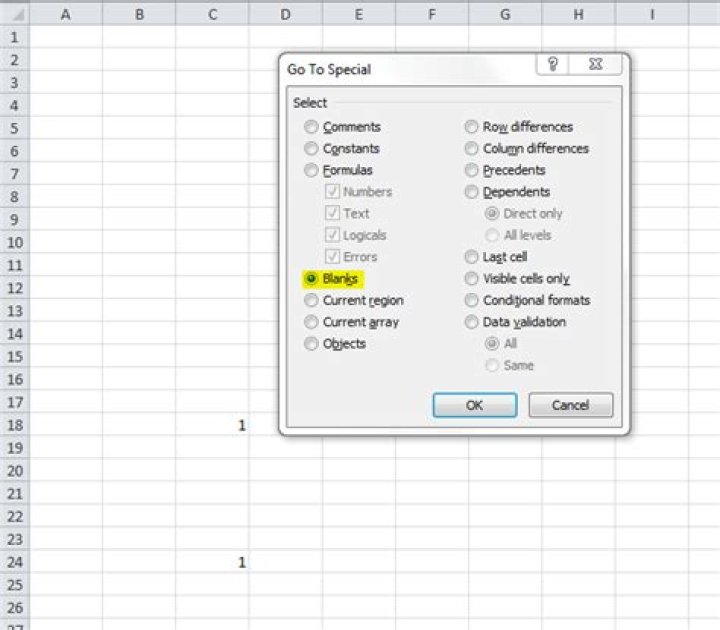
F5, thenSpecial - Check
Blanks, thenOK(see this step in the pic at bottom) - Delete the rows that are now selected (e.g. right click in selection > Delete cells... > Entire row or via the ribbon (see second screenshot))
VBA
Sub QuickCull() On Error Resume Next Columns("C").SpecialCells(xlBlanks).EntireRow.Delete End Sub 

Here's an easy manual method
- Apply an
Auto Filterto your sheet - Filter on column
CBlank - Select all visible rows
- Delete Rows
- Remove filter
This process can be automated with VBA if required. Try running the macro recorder to get a start
0I think the easiest thing assuming you don't have a bunch of other formulas in the other cells is to just sort everything by Column C and then delete all the rows that have a blank for column C(the sort function will put the blank values for column C at the top of the file).
In summary:
- Click on the folded paper cell above cell marked "1" and to the left of cell marked "A" (to highlight all)
- Click on Data, and then sort
- Sort by Column C, and make smallest values be first
- Just highlight the rows down until you hit the first row with a value for Column C, and delete everything you highlighted
This should work.
Columns("C:C").Select Set rngRange = Selection.CurrentRegion lngNumRows = rngRange.Rows.Count lngFirstRow = rngRange.Row lngLastRow = lngFirstRow + lngNumRows - 1 lngCompareColumn = ActiveCell.Column For lngCurrentRow = lngLastRow To lngFirstRow Step -1 If (Cells(lngCurrentRow, lngCompareColumn).Text = "") Then _ Rows(lngCurrentRow).Delete Next lngCurrentRow You can put this code in Sheet Module (Right Mouse Click Sheet Tab and select "View Code"):
Sub Delete_Blank_Rows() 'Deletes the entire row within the selection if the ENTIRE row contains no data. 'We use Long in case they have over 32,767 rows selected. Dim i As Long Dim LastRow As Integer 'We turn off calculation and screenupdating to speed up the macro. With Application .Calculation = xlCalculationManual .ScreenUpdating = False 'Reduce the work on the calc and define the range LastRow = Range("A" & Rows.Count).End(xlUp).Row Range("A2:A" & LastRow).Select 'We work backwards because we are deleting rows. For i = Selection.Rows.Count To 1 Step -1 If WorksheetFunction.CountA(Selection.Rows(i)) = 0 Then Selection.Rows(i).EntireRow.Delete End If Next i .Calculation = xlCalculationAutomatic .ScreenUpdating = True End With End Sub 



