My system:
Laptop Dell inspiron 15 3000 RAM: 16 GB SSD 480 GB Kingston Intel Core i3 7th Generation OS: Ubuntu 18.04 with Software and System Updates Web Browser: Mozilla Firefox, Google Chrome, Palemoon. All latest. Terminal emulator: Yakuake, gnome-terminal. Other Terminal: TTY1 Internet service provider connection speed: 100 Mbps (asymmetric) The upgrade
Just recently I have run sudo apt upgrade in order to upgrade my software from a terminal. Before this everything everything used to be fine. I was able to play videos both with video and audio. And the mkv files used to run smoothly allowing to select any language/subtitle or any other option in the file.
The error received
I am using mpv to play my mkv and other format files like ogv, mpg, mpeg2, mp4, etc.
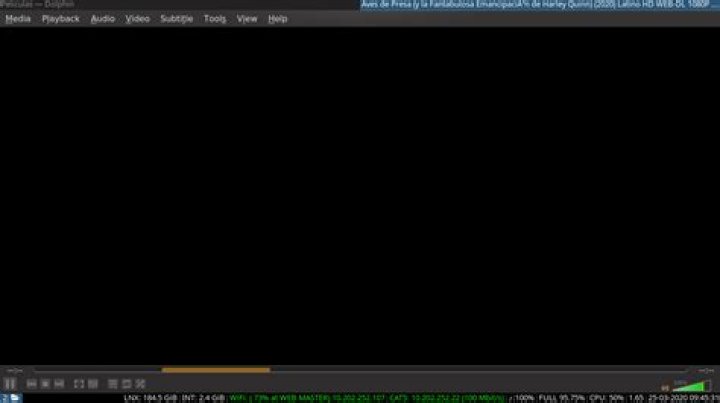
After upgrading all the Software in my system, I started having this kind of screen instead of the video itself.
Other video players have similar behavior becoming unresponsive after few seconds and throwing high processor loads, but it seems that they are looking for a codec, plugin or something in order to do a good job, but they aren't reaching it.
mplayer
Seems to be the only way I can play this videos, with some errors like wrong video duration.
 This video was only played by using the next:
geppettvs@DM4:~/Peliculas$ mplayer BIRDS\ OF\ PREY.2020.WEB-DL.1080P-Ignacio\ Hd.mkv MPlayer 1.3.0 (Debian), built with gcc-7 (C) 2000-2016 MPlayer Team do_connect: could not connect to socket connect: No such file or directory Failed to open LIRC support. You will not be able to use your remote control. Playing BIRDS OF PREY.2020.WEB-DL.1080P-Ignacio Hd.mkv. libavformat version 57.83.100 (external) libavformat file format detected. [lavf] stream 0: video (h264), -vid 0, Ignacio Hd [lavf] stream 1: audio (ac3), -aid 0, -alang spa, Ignacio Hd [lavf] stream 2: audio (ac3), -aid 1, -alang eng, Ignacio Hd [lavf] stream 3: subtitle (srt), -sid 0, -slang spa, Ignacio Hd [lavf] stream 4: video (mjpeg), -vid 1 [lavf] stream 5: video (mjpeg), -vid 2 VIDEO: [H264] 1920x802 0bpp 23.976 fps 0.0 kbps ( 0.0 kbyte/s) Failed to open VDPAU backend libvdpau_va_gl.so: cannot open shared object file: No such file or directory [vdpau] Error when calling vdp_device_create_x11: 1 ========================================================================== Opening video decoder: [ffmpeg] FFmpeg's libavcodec codec family libavcodec version 57.107.100 (external) Selected video codec: [ffh264] vfm: ffmpeg (FFmpeg H.264) ========================================================================== Clip info: title: Aves de Presa (y la Fantabulosa Emancipación de Harley Quinn) (2020) Latino HD WEB-DL 1080P - LatinoMegaHD encoder: libebml v1.3.0 + libmatroska v1.4.1 creation_time: 2020-03-24T06:43:53.000000Z Load subtitles in ./ ========================================================================== Opening audio decoder: [ffmpeg] FFmpeg/libavcodec audio decoders AUDIO: 48000 Hz, 2 ch, floatle, 256.0 kbit/8.33% (ratio: 32000->384000) Selected audio codec: [ffac3] afm: ffmpeg (FFmpeg AC-3) ========================================================================== AO: [pulse] 48000Hz 2ch floatle (4 bytes per sample) Starting playback... Movie-Aspect is 2.39:1 - prescaling to correct movie aspect. VO: [xv] 1920x802 => 1920x802 Planar YV12 A: 9.8 V: 9.8 A-V: 0.000 ct: 0.042 0/ 0 38% 1% 0.7% 0 0 Exiting... (Quit) [mié mar 25 08:08:44 CST 2020] geppettvs@DM4:~/Peliculas$ mplayer BIRDS\ OF\ PREY.2020.WEB-DL.1080P-Ignacio\ Hd.mkv MPlayer 1.3.0 (Debian), built with gcc-7 (C) 2000-2016 MPlayer Team do_connect: could not connect to socket connect: No such file or directory Failed to open LIRC support. You will not be able to use your remote control. Playing BIRDS OF PREY.2020.WEB-DL.1080P-Ignacio Hd.mkv. libavformat version 57.83.100 (external) libavformat file format detected. [lavf] stream 0: video (h264), -vid 0, Ignacio Hd [lavf] stream 1: audio (ac3), -aid 0, -alang spa, Ignacio Hd [lavf] stream 2: audio (ac3), -aid 1, -alang eng, Ignacio Hd [lavf] stream 3: subtitle (srt), -sid 0, -slang spa, Ignacio Hd [lavf] stream 4: video (mjpeg), -vid 1 [lavf] stream 5: video (mjpeg), -vid 2 VIDEO: [H264] 1920x802 0bpp 23.976 fps 0.0 kbps ( 0.0 kbyte/s) Failed to open VDPAU backend libvdpau_va_gl.so: cannot open shared object file: No such file or directory [vdpau] Error when calling vdp_device_create_x11: 1 ========================================================================== Opening video decoder: [ffmpeg] FFmpeg's libavcodec codec family libavcodec version 57.107.100 (external) Selected video codec: [ffh264] vfm: ffmpeg (FFmpeg H.264) ========================================================================== Clip info: title: Aves de Presa (y la Fantabulosa Emancipación de Harley Quinn) (2020) Latino HD WEB-DL 1080P - LatinoMegaHD encoder: libebml v1.3.0 + libmatroska v1.4.1 creation_time: 2020-03-24T06:43:53.000000Z Load subtitles in ./ ========================================================================== Opening audio decoder: [ffmpeg] FFmpeg/libavcodec audio decoders AUDIO: 48000 Hz, 2 ch, floatle, 256.0 kbit/8.33% (ratio: 32000->384000) Selected audio codec: [ffac3] afm: ffmpeg (FFmpeg AC-3) ========================================================================== AO: [pulse] 48000Hz 2ch floatle (4 bytes per sample) Starting playback... Movie-Aspect is 2.39:1 - prescaling to correct movie aspect. VO: [xv] 1920x802 => 1920x802 Planar YV12 A: 15.5 V: 15.5 A-V: 0.000 ct: 0.042 0/ 0 36% 1% 0.6% 0 0 Exiting... (Quit) mpv
Please notice the mpv screen is the black square in the middle of the screenshot.
I mean: this square.
mpv information
mpv 0.27.2 (C) 2000-2017 mpv/MPlayer/mplayer2 projects built on UNKNOWN ffmpeg library versions: libavutil 55.78.100 libavcodec 57.107.100 libavformat 57.83.100 libswscale 4.8.100 libavfilter 6.107.100 libswresample 2.9.100 ffmpeg version: 3.4.6-0ubuntu0.18.04. smplayer
This is smplayer with the same video, you can notice some weird artifacts instead of the video.
smplayer information
This is SMPlayer v. 19.10.2 (revision 9245) running on Linux vlc
VLC shows a black screen and a line running from left to right, like searching for the proper video codec or something, becoming unresponsive after some seconds.
vlc information
VLC media player 3.0.8 Vetinari (revision 3.0.8-0-gf350b6b5a7) VLC version 3.0.8 Vetinari (3.0.8-0-gf350b6b5a7) Compiled by buildd on lcy01-amd64-014.buildd (Sep 11 2019 11:39:37) Compiler: gcc version 7.4.0 (Ubuntu 7.4.0-1ubuntu1~18.04.1) This program comes with NO WARRANTY, to the extent permitted by law. You may redistribute it under the terms of the GNU General Public License; see the file named COPYING for details. Written by the VideoLAN team; see the AUTHORS file. Other video software information and players used for testing
ffmpeg
ffmpeg version 3.4.6-0ubuntu0.18.04.1 Copyright (c) 2000-2019 the FFmpeg developers built with gcc 7 (Ubuntu 7.3.0-16ubuntu3) configuration: --prefix=/usr --extra-version=0ubuntu0.18.04.1 --toolchain=hardened --libdir=/usr/lib/x86_64-linux-gnu --incdir=/usr/include/x86_64-linux-gnu --enable-gpl --disable-stripping --enable-avresample --enable-avisynth --enable-gnutls --enable-ladspa --enable-libass --enable-libbluray --enable-libbs2b --enable-libcaca --enable-libcdio --enable-libflite --enable-libfontconfig --enable-libfreetype --enable-libfribidi --enable-libgme --enable-libgsm --enable-libmp3lame --enable-libmysofa --enable-libopenjpeg --enable-libopenmpt --enable-libopus --enable-libpulse --enable-librubberband --enable-librsvg --enable-libshine --enable-libsnappy --enable-libsoxr --enable-libspeex --enable-libssh --enable-libtheora --enable-libtwolame --enable-libvorbis --enable-libvpx --enable-libwavpack --enable-libwebp --enable-libx265 --enable-libxml2 --enable-libxvid --enable-libzmq --enable-libzvbi --enable-omx --enable-openal --enable-opengl --enable-sdl2 --enable-libdc1394 --enable-libdrm --enable-libiec61883 --enable-chromaprint --enable-frei0r --enable-libopencv --enable-libx264 --enable-shared libavutil 55. 78.100 / 55. 78.100 libavcodec 57.107.100 / 57.107.100 libavformat 57. 83.100 / 57. 83.100 libavdevice 57. 10.100 / 57. 10.100 libavfilter 6.107.100 / 6.107.100 libavresample 3. 7. 0 / 3. 7. 0 libswscale 4. 8.100 / 4. 8.100 libswresample 2. 9.100 / 2. 9.100 libpostproc 54. 7.100 / 54. 7.100 parole
Parole Media Player 1.0.1 totem
totem 3.26.0 libvdpau-va-gl1
As @nobody asked, I checked if libvdpau-va-gl1 is installed in my system, resulting that I didn't have it.
After installing I tried to open the video file resulting in a more clean layout but no full video so far.
Thank you a lot for your wish to help.
dpkg -l | grep gstreamer
geppettvs@DM4:~$ dpkg -l | grep gstreamer ii gir1.2-gstreamer-1.0:amd64 1.14.5-0ubuntu1~18.04.1 amd64 GObject introspection data for the GStreamer library ii gstreamer-qapt 3.0.4-0ubuntu1 amd64 GStreamer plugin to install codecs using QApt ii gstreamer1.0-adapter-pulseeffects:amd64 4.7.2-3~bionic2 amd64 Gstreamer adapter ii gstreamer1.0-alsa:amd64 1.14.5-0ubuntu1~18.04.1 amd64 GStreamer plugin for ALSA ii gstreamer1.0-autogain-pulseeffects:amd64 4.7.2-3~bionic2 amd64 Gstreamer crystalizer ii gstreamer1.0-clutter-3.0:amd64 3.0.26-1 amd64 Clutter PLugin for GStreamer 1.0 ii gstreamer1.0-convolver-pulseeffects:amd64 4.7.2-3~bionic2 amd64 Gstreamer convolver ii gstreamer1.0-crystalizer-pulseeffects:amd64 4.7.2-3~bionic2 amd64 Gstreamer crystalizer ii gstreamer1.0-fluendo-mp3:amd64 0.10.32.debian-1 amd64 Fluendo mp3 decoder GStreamer 1.0 plugin ii gstreamer1.0-gl:amd64 1.14.5-0ubuntu1~18.04.1 amd64 GStreamer plugins for GL ii gstreamer1.0-gtk3:amd64 1.14.5-0ubuntu1~18.04.1 amd64 GStreamer plugin for GTK+3 ii gstreamer1.0-libav:amd64 1.14.5-0ubuntu1~18.04.1 amd64 libav plugin for GStreamer ii gstreamer1.0-nice:amd64 0.1.14-1 amd64 ICE library (GStreamer plugin) ii gstreamer1.0-packagekit 1.1.9-1ubuntu2.18.04.5 amd64 GStreamer plugin to install codecs using PackageKit ii gstreamer1.0-plugins-bad:amd64 1.14.5-0ubuntu1~18.04.1 amd64 GStreamer plugins from the "bad" set ii gstreamer1.0-plugins-base:amd64 1.14.5-0ubuntu1~18.04.1 amd64 GStreamer plugins from the "base" set ii gstreamer1.0-plugins-base:i386 1.14.5-0ubuntu1~18.04.1 i386 GStreamer plugins from the "base" set ii gstreamer1.0-plugins-base-apps 1.14.5-0ubuntu1~18.04.1 amd64 GStreamer helper programs from the "base" set ii gstreamer1.0-plugins-good:amd64 1.14.5-0ubuntu1~18.04.1 amd64 GStreamer plugins from the "good" set ii gstreamer1.0-plugins-ugly:amd64 1.14.5-0ubuntu1~18.04.1 amd64 GStreamer plugins from the "ugly" set ii gstreamer1.0-pulseaudio:amd64 1.14.5-0ubuntu1~18.04.1 amd64 GStreamer plugin for PulseAudio ii gstreamer1.0-tools 1.14.5-0ubuntu1~18.04.1 amd64 Tools for use with GStreamer ii gstreamer1.0-x:amd64 1.14.5-0ubuntu1~18.04.1 amd64 GStreamer plugins for X11 and Pango ii libgstreamer-gl1.0-0:amd64 1.14.5-0ubuntu1~18.04.1 amd64 GStreamer GL libraries ii libgstreamer-plugins-bad1.0-0:amd64 1.14.5-0ubuntu1~18.04.1 amd64 GStreamer libraries from the "bad" set ii libgstreamer-plugins-base1.0-0:amd64 1.14.5-0ubuntu1~18.04.1 amd64 GStreamer libraries from the "base" set ii libgstreamer-plugins-base1.0-0:i386 1.14.5-0ubuntu1~18.04.1 i386 GStreamer libraries from the "base" set ii libgstreamer-plugins-good1.0-0:amd64 1.14.5-0ubuntu1~18.04.1 amd64 GStreamer development files for libraries from the "good" set ii libgstreamer1.0-0:amd64 1.14.5-0ubuntu1~18.04.1 amd64 Core GStreamer libraries and elements ii libgstreamer1.0-0:i386 1.14.5-0ubuntu1~18.04.1 i386 Core GStreamer libraries and elements ii libreoffice-avmedia-backend-gstreamer 1:6.0.7-0ubuntu0.18.04.10 amd64 GStreamer backend for LibreOffice ii phonon-backend-gstreamer:amd64 4:4.9.0-1 amd64 Phonon GStreamer 1.0 backend ii phonon-backend-gstreamer-common:amd64 4:4.9.0-1 amd64 Phonon GStreamer 1.0.x backend icons ii phonon4qt5-backend-gstreamer:amd64 4:4.9.0-1 amd64 Phonon Qt5 GStreamer 1.0 backend 1 Answer
We could revive at least mpv. By installing libvdpau-va-gl1.
Failed to open VDPAU backend libvdpau_va_gl.so: cannot open shared object file: No such file or directory
Next step was to update the system complete. Then we created a small $HOME/.config/mpv/config with this content.
vo=vaapi #use vaapi for hardware decoding hwdec=vaapi # maybe not longer required ao=pulse #use pulse for audio overview gives mpv --audio-device=help More options can be read in
zless /usr/share/doc/mpv/mpv.conf.gz