I'm trying to setup my own (home) NAS. I don't want RAID, I want to use a more flexible form:
- Mix and match harddrives (now I have 4x 2gb, but for sure when I upgrade I don't want to buy 4 new ones at the same time)
- Some form of duplication (not backup, but something safer than JBOD)
- Duplication of selected folders
I've tried Windows Server 2012 R2 with Stablebit Drivepool (looks very good and works simple). Now I also want to try it with Ubuntu but I have a hard time finding out what kind of software is available for this?
I saw Greyhole (but has a bad review: )
Any other ways to do this? Or applications?
21 Answer
You should use LVM and a cloning cron script.
I am going to assume this setup for you:
- 4 drives for LVM and file storage.
- External USB drive for backups. (at
/dev/sdf1) - No duplication -- use
ddto completely clone as necessary.
LVM
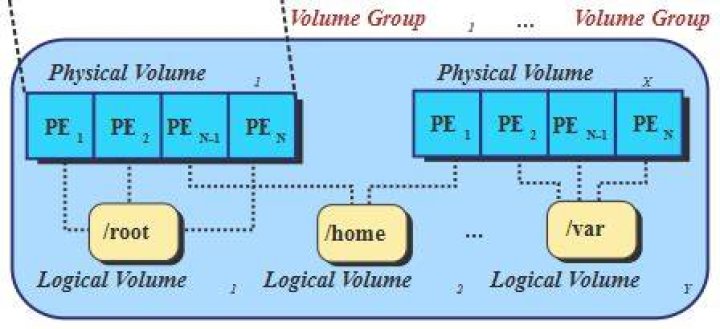
You need to first set up LVM. This diagram is a good example:

Use a hard drive, and assign each to a LVM folder such as /lvm or whatever. This article is very good for describing LVM. I recommend reading it for a better and more detailed LVM introduction.
First off, partition all storage drives, but do not add a partition scheme! Use unallocated as the partition type. I will assume that your storage partitions are /dev/sdb1, /dev/sdc1, /dev/sdd1, and /dev/sde1. Your installation will be at /dev/sda1.
Next, you need to make the drivers LVM-ready:
pvcreate /dev/sdb1 /dev/sdc1 /dev/sdd1 /dev/sde1 Once that is done, you want to group those drives:
vgcreate homeNAS /dev/sdb1 /dev/sdc1 /dev/sdd1 /dev/sde1 This creates a group called "homeNAS" that conains all of the above drives.
Next, create the Logical Volume:
lvcreate --name share homeNAS Create the filesystem:
mkfs.ext3 /dev/homeNAS/share Once this is done, run the following to create the lvm folder:
mkdir /lvm/ Mount it using:
mount /dev/homeNAS/share /lvm To mount it on every boot, add the following to the end of your /etc/fstab. Make a backup!!
/dev/homeNAS /lvm ext3 rw,noatime 0 0 Note that the above guide for LVM is very basic, and is not meant for fancy things. Read the linked article for a much more detailed explanation.
Cron Script
First off, get an external disc drive. It should be plenty big for storing all of your files. It should be able to hold 1.5x the size of your entire LVM partition (ie, 500GB HDD = 750GB backup).
I will assume your drive has one partition (ext4 at /dev/sdf1, which is mounted at /media/backup)
Create a shell script named lvm-backup.sh in /etc/lvm-scripts/ like this:
cp /lvm/folder1/ /media/backup/lvm/folder1 cp /lvm/folder2/ /media/backup/lvm/folder2 cp /lvm/folder3/ /media/backup/lvm/folder3 cp /lvm/folder4/ /media/backup/lvm/folder4 What this'll do is copy the specified folders to the backup drive. You should not clone directly, as that takes forever and can be detrimental to your system.
Quickly run:
chown root:root /etc/lvm-scripts/lvm-backup.sh chmod +x /etc/lvm-scripts/lvm-backup.sh To run the backup nightly at midnight, add this to your /etc/crontab:
00 00 * * * sh /etc/lvm-scripts/lvm-backup.sh If you want more specific control of when to run the script, see this Howto on Cron.
2