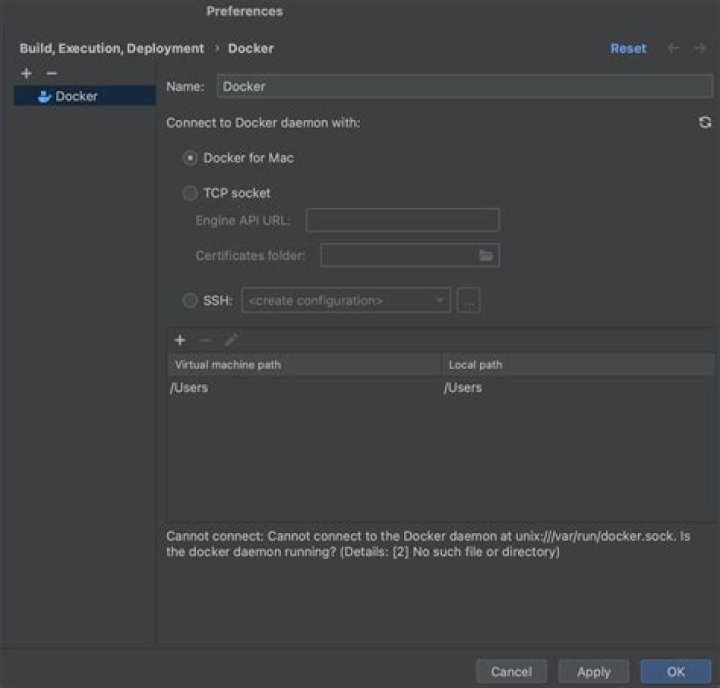
I downloaded Docker using Docker Desktop for Apple M1 chips. I can run containers, the integration with VsCode works okay but I can't integrate it with Intellij IDEA Ultimate. It keeps giving this error. 
But I can run my containers and create images from the terminal, I can also see the containers and images in Docker Desktop too. What could be the reason behind this? I also tried to check whether var/run/docker.sock is existing and it really isn't, there is no such file as that.
I also tried the same steps on my second computer and the exact same thing happened. Steps to reproduce: 1- Download Intellij IDEA Ultimate, open a repo that uses docker 2- Download Docker Desktop for Mac M1 3- Try to add Docker service to Intellij
I didn't do anything else because I think Docker Desktop is enough to configure everything on Mac. I am trying to run an FT on intellij and I get the error
[main] ERROR o.t.d.DockerClientProviderStrategy - Could not find a valid Docker environment. Please check configuration. Attempted configurations were: [main] ERROR o.t.d.DockerClientProviderStrategy - UnixSocketClientProviderStrategy: failed with exception InvalidConfigurationException (Could not find unix domain socket). Root cause NoSuchFileException (/var/run/docker.sock) [main] ERROR o.t.d.DockerClientProviderStrategy - DockerMachineClientProviderStrategy: failed with exception ShellCommandException (Exception when executing docker-machine status ). Root cause InvalidExitValueException (Unexpected exit value: 1, allowed exit values: [0], executed command [docker-machine, status, ], output was 122 bytes: Docker machine "" does not exist. Use "docker-machine ls" to list machines. Use "docker-machine create" to add a new one.) [main] ERROR o.t.d.DockerClientProviderStrategy - As no valid configuration was found, execution cannot continue I've been trying everything for the last 2 days but I can't seem to find a solution.
35 Answers
EDITED 2022-10-31
Release notes for Docker Desktop (4.13.1) (and following versions), states that, there is no need to create the symlink anymore, citing notes:
Added back the
/var/run/docker.socksymlink on Mac by default, to increase compatibility with tooling liketiltanddocker-py. Fixes docker/for-mac#6529.
The official fix now is to UPGRADE your Docker Desktop installation.
For the Docker Desktop (4.13.0) version:
By default Docker will not create the /var/run/docker.sock symlink on the host and use the docker-desktop CLI context instead. (see: )
That will prevent IntelliJ from finding Docker using the default context.
You can see the current contexts in your machine by running docker context ls, which should produce an output like:
NAME TYPE DESCRIPTION DOCKER ENDPOINT KUBERNETES ENDPOINT ORCHESTRATOR default moby Current DOCKER_HOST based configuration unix:///var/run/docker.sock (default) swarm desktop-linux * moby unix:///Users/<USER>/.docker/run/docker.sock As a workaround that will allow IntelliJ to connect to Docker you can use the TCP Socket checkbox and put in the Engine API URL the value that appears under DOCKER ENDPOINT in the active context.
The case for this example will be: unix:///Users/<USER>/.docker/run/docker.sock
Then IntelliJ will be able to connect to Docker Desktop.
EDITED 2023-07-17
If the option in "Settings > Advanced > Allow the default Docker socket to be used" is already enabled and the socket is not available try disabling it and re-enabling it.
Another way to make IntelliJ (and other components that rely on the default config) to find Docker will be to manually create a symlink to the new DOCKER ENDPOINT by running:
sudo ln -svf /Users/<USER>/.docker/run/docker.sock /var/run/docker.sock In that way all the components looking for Docker under /var/run/docker.sock will find it.
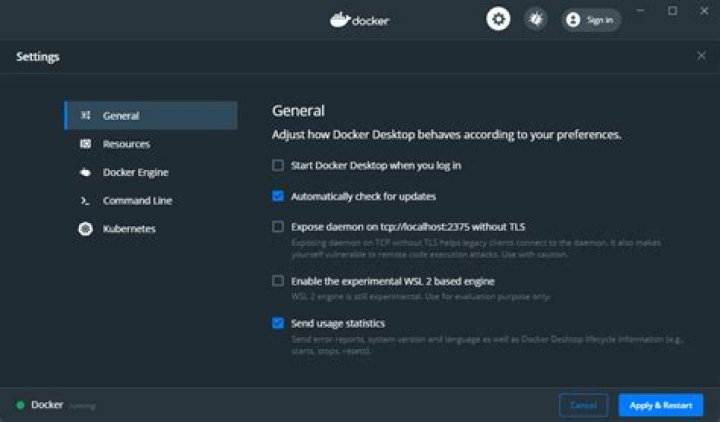
I'm running Docker Desktop v4.18.0 and I fixed this by
- going to settings in Docker Desktop
- click
Advanced - check
Enable default Docker socket. Underneath this option is an explanation saying,Creates /var/run/docker. sock which some third-party clients may use to communicate with Docker Desktop. - click
Apply & restartand try running again
For some reason, after updating the macOS docker version, it doesn’t create the /var/run/docker.sock file anymore. Creating a symlink is a hacky way and not recommended.
My solution is to set the $DOCKER_HOST environment variable:
export DOCKER_HOST=unix:///Users/<USER>/.docker/run/docker.sock or add it to .zshrc:
echo "export DOCKER_HOST=unix:///Users/<USER>/.docker/run/docker.sock" >> ~/.zshrc or add it in the IntelliJ run configuration.
I encountered this problem with Testcontainers, which you can also fix by editing ~/.testcontainers.properties:
cat .testcontainers.properties #Modified by Testcontainers #Mon May 29 11:42:37 EEST 2023 docker.client.strategy=org.testcontainers.dockerclient.EnvironmentAndSystemPropertyClientProviderStrategy testcontainers.reuse.enable=true docker.host=unix\:///Users/<USER>/.docker/run/docker.sock Edit documentaton:
Customizing Docker host detection Testcontainers will attempt to detect the Docker environment and configure everything to work automatically.
However, sometimes customization is required. Testcontainers will respect the following environment variables:
DOCKER_HOST = unix:///var/run/docker.sock See Docker environment variables
TESTCONTAINERS_DOCKER_SOCKET_OVERRIDE Path to Docker's socket. Used by Ryuk, Docker Compose, and a few other containers that need to perform Docker actions. Example: /var/run/docker-alt.sock
TESTCONTAINERS_HOST_OVERRIDE Docker's host on which ports are exposed. Example: docker.svc.local
For Docker Desktop from version 4.17 go to Settings -> General and enable option "Open Docker Dashboard at startup" then restart Mac. This will create socket at correct path.
1Add the following line to Environment variables of IDEA:
XDG_RUNTIME_DIR=/Users/<USER>/.docker/run/ 



