
Im having a huge issue and I can't get round it
Basically i went through the Laravel installation and installed homestead 7 and im using virtual box... vagrant
Now before this I'm using docker to run other application through it... which worked and it looks like something i've done is using the same port so I now cant use docker on that port
Cannot start service website: driver failed programming external connectivity on endpoint distinctly_website_1 (edc81f653cb3ac8c2af9b7ce070d0a0ccbb3ec255af452338ff4677ce99b156a): Error starting userland proxy: Bind for 0.0.0.0:80: unexpected error (Failure EADDRINUSE) ERROR: Encountered errors while bringing up the project.
I just need some help with removing this conflict with the port so I can run my docker applications. I dont care about anything than docker
34 Answers
Just an update found a solution
sudo apachectl stop this stopped the service that was conflicting and i can now use my docker image
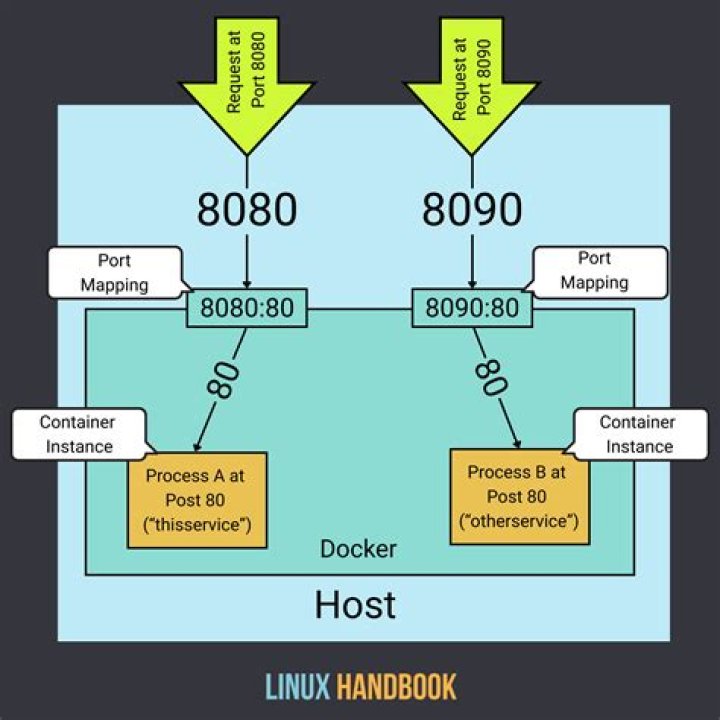
Just use a different port on your host when running the container. something like docker run -p 8080:80 IMAGE_NAME.
So your container will be available on the host on port 8080, but it talks to the container (and application) on port 80.
You can determine which process is listening on the port by running the command
netstat -nlp | grep 80 Once you find that program, you can kill it by running
kill <pid> netstat: option requires an argument -- p Usage: netstat [-AaLlnW] [-f address_family | -p protocol]
netstat [-gilns] [-f address_family] netstat -i | -I interface [-w wait] [-abdgRtS] netstat -s [-s] [-f address_family | -p protocol] [-w wait] netstat -i | -I interface -s [-f address_family | -p protocol] netstat -m [-m] netstat -r [-Aaln] [-f address_family] netstat -rs [-s] 



