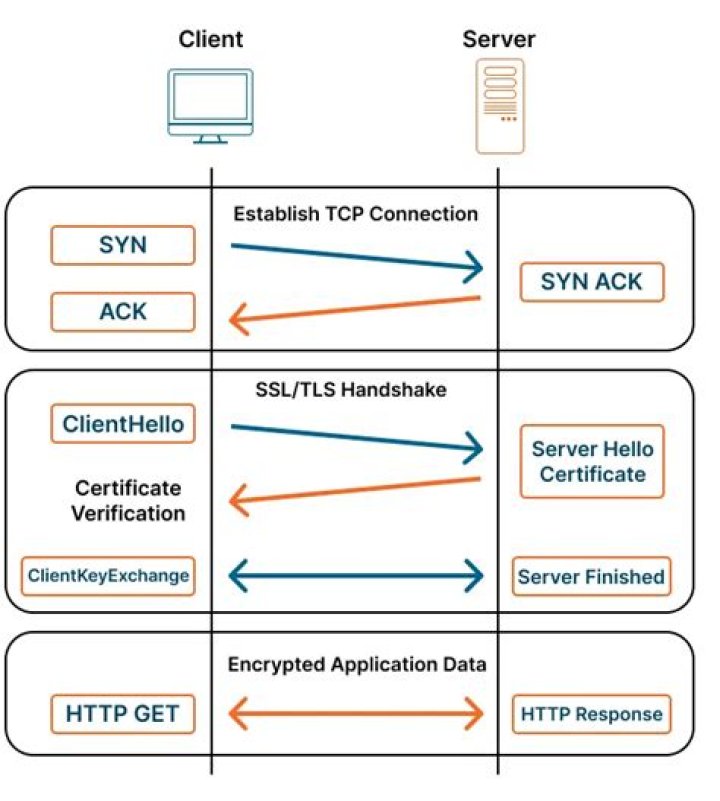

I have just installed docker and then try running hello-worldprogram. My server is behind proxy of company. So, I set proxy environment variables according to manual from docker in a file named /etc/systemd/system/docker.service.d/http-proxy.conf:
[Service] Environment="HTTP_PROXY=" Environment="HTTPS_PROXY=" Environment="NO_PROXY=localhost,127.0.0.1,localaddress,.localdomain.com" But, while run $ sudo docker run hello-world. I get the error
Unable to find image 'hello-world:latest' locally docker: Error response from daemon: Get proxyconnect tcp: tls: first record does not look like a TLS handshake. See 'docker run --help'. This is docker version:
Client: Docker Engine - Community Version: 19.03.9 API version: 1.40 Go version: go1.13.10 Git commit: 9d988398e7 Built: Fri May 15 00:25:34 2020 OS/Arch: linux/amd64 Experimental: false Server: Docker Engine - Community Engine: Version: 19.03.9 API version: 1.40 (minimum version 1.12) Go version: go1.13.10 Git commit: 9d988398e7 Built: Fri May 15 00:24:07 2020 OS/Arch: linux/amd64 Experimental: false containerd: Version: 1.2.6 GitCommit: 894b81a4b802e4eb2a91d1ce216b8817763c29fb runc: Version: 1.0.0-rc8 GitCommit: 425e105d5a03fabd737a126ad93d62a9eeede87f docker-init: Version: 0.18.0 GitCommit: fec3683 This is docker info ( I hidden informations about proxy of my company ):
Client: Debug Mode: false Server: Containers: 0 Running: 0 Paused: 0 Stopped: 0 Images: 0 Server Version: 19.03.9 Storage Driver: overlay Backing Filesystem: extfs Supports d_type: true Logging Driver: json-file Cgroup Driver: cgroupfs Plugins: Volume: local Network: bridge host ipvlan macvlan null overlay Log: awslogs fluentd gcplogs gelf journald json-file local logentries splunk syslog Swarm: inactive Runtimes: runc Default Runtime: runc Init Binary: docker-init containerd version: 894b81a4b802e4eb2a91d1ce216b8817763c29fb runc version: 425e105d5a03fabd737a126ad93d62a9eeede87f init version: fec3683 Security Options: apparmor seccomp Profile: default Kernel Version: 4.15.0-65-generic Operating System: Ubuntu 16.04.6 LTS OSType: linux Architecture: x86_64 CPUs: 48 Total Memory: 31.31GiB Name: SPP00007867 ID: EEZD:GC4D:IWYF:2MVR:RLXW:MAZU:EQPV:A3FY:RFUY:6NXP:EJNG:TRMD Docker Root Dir: /mnt/docker-data Debug Mode: false HTTP Proxy: HTTPS Proxy: No Proxy: localhost,127.0.0.1,localaddress,.localdomain.com Registry: Labels: Experimental: false Insecure Registries: 127.0.0.0/8 Live Restore Enabled: false WARNING: No swap limit support WARNING: the overlay storage-driver is deprecated, and will be removed in a future release. Can anyone help me ? Thank All !!!
71 Answer
I had this exact issue and it was due to HTTPS_PROXY not having the correct variable (https instead of http) assigned to it in both bashrc and docker desktop settings configuration
1



