I am trying to create a custom row that shows an image. So I started by trying the basic custom row indicated in Eureka's page:
Here's the code I am using:
import Eureka public class CustomCell2: Cell<Bool>, CellType{ @IBOutlet weak var switchControl: UISwitch! @IBOutlet weak var label: UILabel! public override func setup() { super.setup() switchControl.addTarget(self, action: #selector(CustomCell2.switchValueChanged), forControlEvents: .ValueChanged) } func switchValueChanged(){ row.value = switchControl.on row.updateCell() // Re-draws the cell which calls 'update' bellow } public override func update() { super.update() backgroundColor = (row.value ?? false) ? .whiteColor() : .blackColor() } } public final class CustomRow: Row<Bool, CustomCell2>, RowType { required public init(tag: String?) { super.init(tag: tag) // We set the cellProvider to load the .xib corresponding to our cell cellProvider = CellProvider<CustomCell2>(nibName: "CustomCell2") } } And that is saved as CustomCell2.swift. I am calling that custom row using this: futurSection <<< CustomRow ("")
But I am getting an error: Could not load NIB in bundle with name 'CustomCell2'
And, how do I change that into an UIImage?
41 Answer
Hello I had been reviewing your question and this are my results
I use your code and make some modifications this is my EurekaCustomImageCell.swift
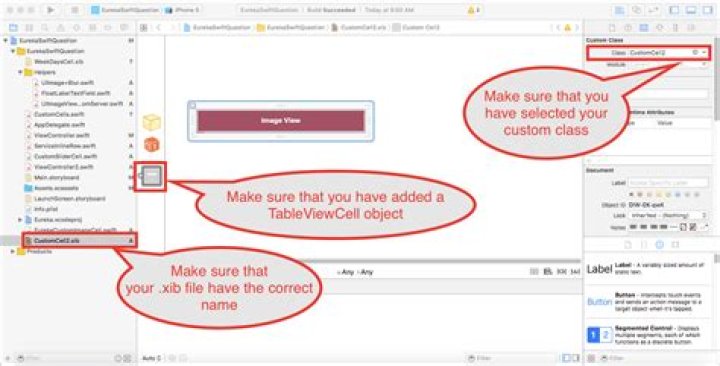
import UIKit import Eureka public class CustomCell2: Cell<Bool>, CellType{ @IBOutlet weak var customImage: UIImageView! public override func setup() { super.setup() } public override func update() { super.update() backgroundColor = (row.value ?? false) ? .whiteColor() : .blackColor() } } public final class CustomRow: Row<Bool, CustomCell2>, RowType { required public init(tag: String?) { super.init(tag: tag) // We set the cellProvider to load the .xib corresponding to our cell cellProvider = CellProvider<CustomCell2>(nibName: "CustomCell2") } } as you can see here is a @IBOutlet weak var customImage: UIImageView! this is an outlet defined in my xib file for this custom cell, check this image

I hope this helps you, this works for me without problems




