Note:Answering my own problem here to help people in future
When running an application after installing it on a new PC and using ConnectDirect to transfer files from Windows to Unix I am seeing the error message:
System.Runtime.InteropServices.COMException (0x00000009): Could not establish a connection to server Could not establish a connection to server
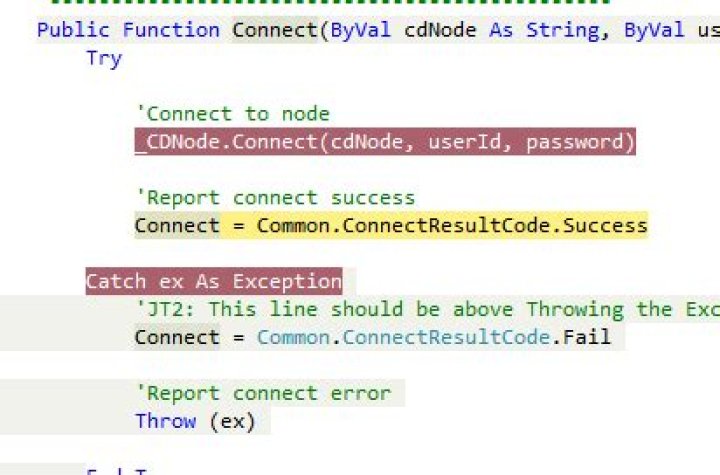
It happens on the Connect method:

See below to solve it.
1 Answer
You need to add a registry key here:
Windows Registry Editor Version 5.00 [HKEY_USERS\S-1-5-21-3499964120-3315823391-1593708255-109682\Software\Sterling Commerce CONNECT:Direct] [HKEY_USERS\S-1-5-21-3499964120-3315823391-1593708255-109682\Software\Sterling Commerce CONNECT:Direct\Nodes] [HKEY_USERS\S-1-5-21-3499964120-3315823391-1593708255-109682\Software\Sterling Commerce CONNECT:Direct\Nodes\**CDServer.example.com**] "CDName"="**CDServer**" "ApiVersion"=dword:0000107f "SecurePlusVersion"=dword:00000000 "CompLevel"=dword:00000001 "SelectedOSType"=dword:00000000 "OSType"=dword:00000002 "SubType"=dword:00000000 "Server"="**CDServer**" "DefaultProtocol"="TCPIP" "DefaultUserid"="**CDPassword**" [HKEY_USERS\S-1-5-21-3499964120-3315823391-1593708255-109682\Software\Sterling Commerce CONNECT:Direct\Nodes\**CDServer.example.com**\Protocols] [HKEY_USERS\S-1-5-21-3499964120-3315823391-1593708255-109682\Software\Sterling Commerce CONNECT:Direct\Nodes\**CDServer.example.com**\Protocols\TCPIP] "TcpAddress"="**CDServer.example.com**;1363" [HKEY_USERS\S-1-5-21-3499964120-3315823391-1593708255-109682\Software\Sterling Commerce CONNECT:Direct\Nodes\**CDServer.example.com**\Userids] [HKEY_USERS\S-1-5-21-3499964120-3315823391-1593708255-109682\Software\Sterling Commerce CONNECT:Direct\Nodes\**CDServer.example.com**\Userids\**CDPassword**] "Password"="6 XFWmtqzo5" "Temporary"=dword:00000000 "RememberPW"=dword:00000001 Before you import the the registry file you will need to replace the Windows User ID with the Users PC you're about to import the file in.
The Windows User ID hardcoded in the file is 109682, to find the Windows User ID of the Users PC find it here:
HKEY_LOCAL_MACHINE\SYSTEM\CurrentControlSet\Control\hivelist




