I've been trying to make tail a little more readable for server startups. My current command filters out most of the INFO and DEBUG messages from the startup:
tail -F ../server/durango/log/server.log | grep -e "ERROR" -e "WARN" -e "Shutdown" -e "MicroKernel" | grep --color=auto -E 'MicroKernel|$' What I would like to do is craft something that would highlight WARN in yellow and ERROR in red, and MicroKernel in green. I tried just piping grep --color=auto multiple times, but the only color that survives is the last command in the pipe.
Is there a one liner to do this? Or even a many-liner?
26 Answers
yes, there is way to do this. That is, as long as your terminal supports ANSI escape sequences. This is most terminals that exist.
I think I don't need explain how to grep, sed etc. point is the color right?
see below, this will make
WARN yellow ERROR red foo green here is example:
kent$ echo "WARN ERROR foo"|sed 's#WARN#\x1b[33m&#; s#ERROR#\x1b[31m&#; s#foo#\x1b[32m&#' Note: \x1b is hexadecimal for the ESC character (^VEsc).
to see the result:

I wrote a script for this years ago. You can easily cover the case of multiple colors by piping successive invocations of highlight to each other.
From the README:
Usage: ./highlight [-i] [--color=COLOR_STRING] [--] <PATTERN0> [PATTERN1...] This is highlight version 1.0. This program takes text via standard input and outputs it with the given perlre(1) pattern(s) highlighted with the given color. If no color option is specified, it defaults to 'bold red'. Colors may be anything that Perl's Term::ANSIColor understands. This program is similar to "grep --color PATTERN" except both matching and non-matching lines are printed. The default color can be selected via the $HIGHLIGHT_COLOR environment variable. The command-line option takes precedence. Passing -i or --ignore-case will enable case-insensitive matching. If your pattern begins with a dash ('-'), you can pass a '--' argument after any options and before your pattern to distinguish it from an option. I have been using a tool called grc for this for years. works like a charm. It comes with some quite good templates for many standard log outputs and formats and it is easy to define your own. A command I use often is
grc tail -f /var/log/syslog It colorizes the syslog output so it is easy to spot errors (typically marked red.
Find the tool here:
(it is also available as package for most common linux flavours).
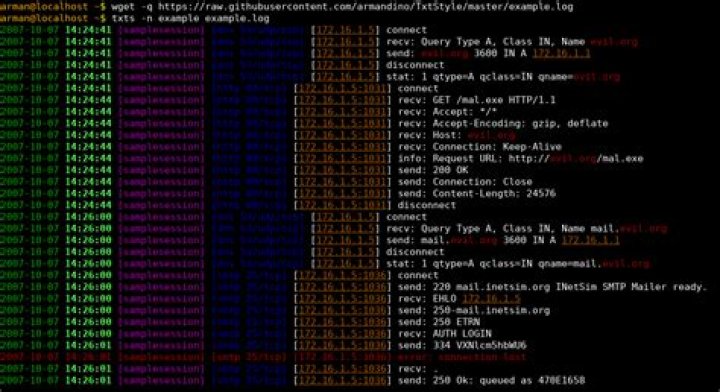
2I wrote TxtStyle, a small utility for colorising logs. You define regular expressions to highlight in ~/.txts.conf file:
[Style="example"] !red: regex("error") green: regex("\d{4}-\d\d-\d\d") # ... And then apply the styles:
txts -n example example.log or you can also pipe the output
tail -f example.log | txts -n example
You can create a colored log instead of using a complex command.
For php is like this:
echo "^[[30;43m".$ip."^[[0m"; The key point is to use Ctrl-v ctrl-[ to input a green ^[ under insert mode in vim, direct input ^[ does not work.
My sample using awk. Match log format like: xxxx [debug] xxxxx xxxx xxxx
black=30m red=31m green=32m yellow=33m blue=34m magenta=35m cyan=36m white=37m blacklog="\"\033[$black\" \$0 \"\033[39m\"" redlog="\"\033[$red\" \$0 \"\033[39m\"" greenlog="\"\033[$green\" \$0 \"\033[39m\"" yellowlog="\"\033[$yellow\" \$0 \"\033[39m\"" bluelog="\"\033[$blue\" \$0 \"\033[39m\"" magentalog="\"\033[$magenta\" \$0 \"\033[39m\"" cyanlog="\"\033[$cyan\" \$0 \"\033[39m\"" whitelog="\"\033[$white\" \$0 \"\033[39m\"" trace="/\[trace\]/ {print $redlog}" debug="/\[debug\]/ {print $magentalog}" info="/\[info\]/ {print $greenlog}" warning="/\[warning\]/ {print $bluelog}" error="/\[error\]/ {print $yellowlog}" yourcommand | awk "$trace $debug $info $warning $error" 



