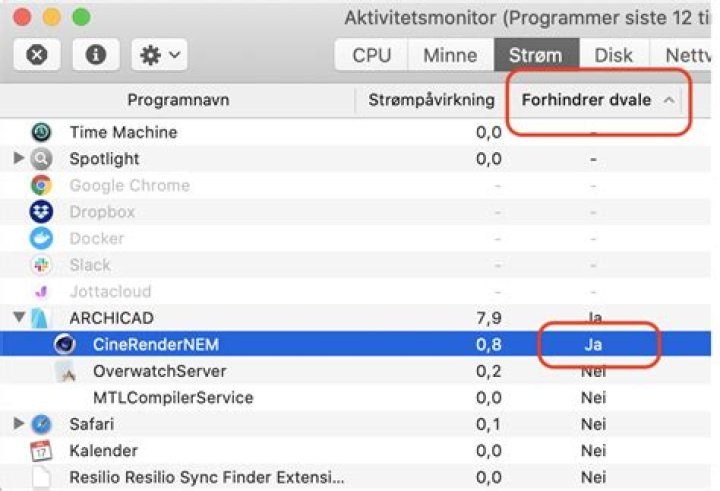
ArchiCAD bundles a rendering software called Cinerender. When I keep ArchiCAD open my computer never sleeps and according to the Activity Monitor (see screenshot) this is caused by the Cinerender NEM process. But while this might make sens when rendering it does not make any sense when I am just modeling in the CAD software.
Is there any way of avoiding Cinerender from blocking the computer going to sleep (while not rendering)?

Looking through the 1.8 million lines from the logs in the last 8 hours did not really bring any other hints than these lines:
2020-02-20 03:13:19.022397+0100 0x8b4b85 Default 0x0 169 8 dasd: (DuetActivitySchedulerDaemon) [com.apple.duetactivityscheduler:scoring] 0:com.apple.applessdbgrefresh.activity:78EF29:[ {name: DeviceActivityPolicy, policyWeight: 20.000, response: {Decision: Must Not Proceed, Score: 0.00, Rationale: [{deviceActivity == 4}]}} ], FinalDecision: Must Not Proceed} {name: PowerNapPolicy, policyWeight: 5.000, response: {Decision: Must Not Proceed, Score: 0.00, Rationale: [{(inADarkWake == 0 AND appRefresh == 1) AND wakeState == "0x1f"}]}} ], FinalDecision: Must Not Proceed} 



