Recently, my install of Chrome (currently version 31.0.1650.63 m, win 8.1x64) has been opening images from sites such as imgur in their full resolution glory and not resizing to fit the screen as it a) used to and b) IE/FF continue to do. I noticed this about a month ago from opening imgur links from Reddit and this afternoon, it finally bugged me enough to seek out a solution.
I am sure there is a setting(?) but I cannot find much help in what would have caused this and how to remedy it.
Chrome:

IE 11:
3 Answers
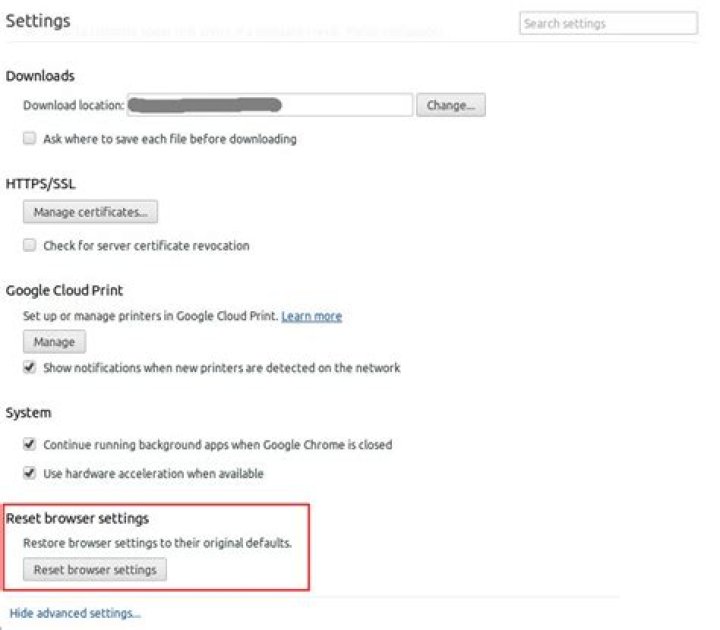
You can reset Chrome's to defaults in Advanced Settings:
Or you can try re-installing Chrome, which should do the same thing. There is no setting option for image re-sizing, it is likely a bug you are encountering from the upgrade to Windows 8.
3Try pressing Ctrl+0 or Command+0 to reset your zoom to 100%. (That 0 is a zero, not a capital "oh".)
7On Mac OS X, by default Chrome doesn't resize a single-image page to fit the viewport (at least as of version 44.0.2403.155, August 15 2015). Instead it displays the image with its full native resolution. If you want Chrome to resize all single-image pages that you visit, you'll need to install an extension such Image Autosizer. Without an extension, your best bet is to click on the image once to enable the "zoom" tooltip. Then clicking the image a second time should zoom out such that most of it fits on the screen. Here's a large image that you can use to test this.
4



