
When I'm trying to set up a socket server, I've got an error message:
Exception in thread "main" java.net.BindException: Cannot assign requested address: JVM_Bind at java.net.PlainSocketImpl.socketBind(Native Method) at java.net.PlainSocketImpl.bind(PlainSocketImpl.java:383) at java.net.ServerSocket.bind(ServerSocket.java:328) at java.net.ServerSocket.<init>(ServerSocket.java:194) at java.net.ServerSocket.<init>(ServerSocket.java:106) at socketyserver.SocketyServer.main(SocketyServer.java:12) Java Result: 1 Whole code is simplest as it can be:
public static void main(String[] args) throws UnknownHostException, IOException { ServerSocket serverSocket; serverSocket = new ServerSocket(9999); } I'm 100% sure that my ports are forwarded, Windows Firewall is off. Nothing blocks port 9999. What else can go wrong?
315 Answers
It may be related to a misconfiguration in your /etc/hosts. In my case, it was like this: 192.168.1.11 localhost instead of 127.0.0.1 localhost
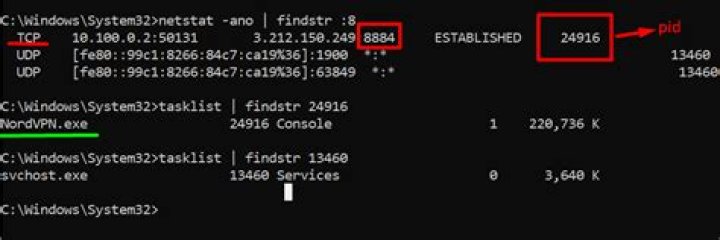
As other people have pointed out, it is most likely related to another process using port 9999. On Windows, run the command:
netstat -a -n | grep "LIST" And it should list anything there that's hogging the port. Of course you'll then have to go and manually kill those programs in Task Manager. If this still doesn't work, replace the line:
serverSocket = new ServerSocket(9999); With:
InetAddress locIP = InetAddress.getByName("192.168.1.20"); serverSocket = new ServerSocket(9999, 0, locIP); Of course replace 192.168.1.20 with your actual IP address, or use 127.0.0.1.
Just for others who may look at this answer in the hope of solving a similar problem, I got a similar message because my ip address changed.
java.net.BindException: Cannot assign requested address: bind at sun.nio.ch.Net.bind(Native Method) at sun.nio.ch.ServerSocketChannelImpl.bind(ServerSocketChannelImpl.java:126) at sun.nio.ch.ServerSocketAdaptor.bind(ServerSocketAdaptor.java:59) at org.eclipse.jetty.server.nio.SelectChannelConnector.open(SelectChannelConnector.java:182) at org.eclipse.jetty.server.AbstractConnector.doStart(AbstractConnector.java:311) at org.eclipse.jetty.server.nio.SelectChannelConnector.doStart(SelectChannelConnector.java:260) at org.eclipse.jetty.util.component.AbstractLifeCycle.start(AbstractLifeCycle.java:59) at org.eclipse.jetty.server.Server.doStart(Server.java:273) at org.eclipse.jetty.util.component.AbstractLifeCycle.start(AbstractLifeCycle.java:59) The error says Cannot assign requested address. This means that you need to use the correct address for one of your network interfaces or 0.0.0.0 to accept connections from all interfaces.
The other solutions about ports only work after sometimes-failing black magic (like working after some computer restarts but not others) because the port is completely irrelevant.
0Java documentation for java.net.BindExcpetion,
Signals that an error occurred while attempting to bind a socket to a local address and port. Typically, the port is in use, or the requested local address could not be assigned.
Cause:
The error is due to the second condition mentioned above. When you start a server(Tomcat,Jetty etc) it listens to a port and bind a socket to an address and port. In Windows and Linux the hostname is resolved to IP address from /etc/hosts This host to IP address mapping file can be found at C:\Windows\System32\Drivers\etc\hosts. If this mapping is changed and the host name cannot be resolved to the IP address you get the error message.
Solution:
Edit the hosts file and correct the mapping for hostname and IP using admin privileges.
eg:
#127.0.0.1 localhost 192.168.52.1 localhost Read more: java.net.BindException : cannot assign requested address.
4if your are using server, there's "public network IP" and "internal network IP". Use the "internal network IP" in your file /etc/hosts and "public network IP" in your code. if you use "public network IP" in your file /etc/hosts then you will get this error.
0For me it was because a previous jmeter.properties change was still in play
httpclient.localaddress=12.34.56.78 In my case: Just restarted my computer and everything works fine after that.
As the error states, it can't bind - which typically means it's in use by another process. From a command line run:
netstat -a -n -o
Interrogate the output for port 9999 in use in the left hand column.
2In my case, delete from /etc/hosts
- 127.0.0.1 localhost
- 192.168.100.20 localhost <<<<---- (delete or comment)
I came across this error when copying configurations from one server to another.
I had the old host's hostname in my ${JETTY_BASE}/start.ini jetty.host property. Setting the correct jetty.host property value solved the issue for me.
Hope this helps someone in the future who has to work on multiple servers at once.
if you happened on CentOS?
You should try to this.
$ service network restart
or
reboot your server.
My laptop has an internal DNS name in the network, it was fine until something and then has broken.
To fix i added a line to route all requests by DNS name to my 127.0.0.1, my /etc/hosts looks like this:
127.0.0.1 localhost 127.0.0.1 host.docker.internal 127.0.0.1 my-url.box #added for the problem Might be relevant for someone.
It is easy to debug, just run a class until this is green:
public static void main(String[] args) throws Exception { new ServerSocket(0, 1, InetAddress.getLocalHost()); } The port is taken by another process. Possibly an unterminated older run of your program. Make sure your program has exited cleanly or kill it.
2java.net.BindException: Cannot assign requested address
According to BindException documentation, it basically:
Signals that an error occurred while attempting to bind a socket to a local address and port. Typically, the port is in use, or the requested local address could not be assigned.
So try the following command:
sudo lsof -i:8983 to double check if any application is using the same port and kill it.
If that's not the case, make sure that your IP address to which you're trying to bind is correct (it's correctly assigned to your network interface).
2



