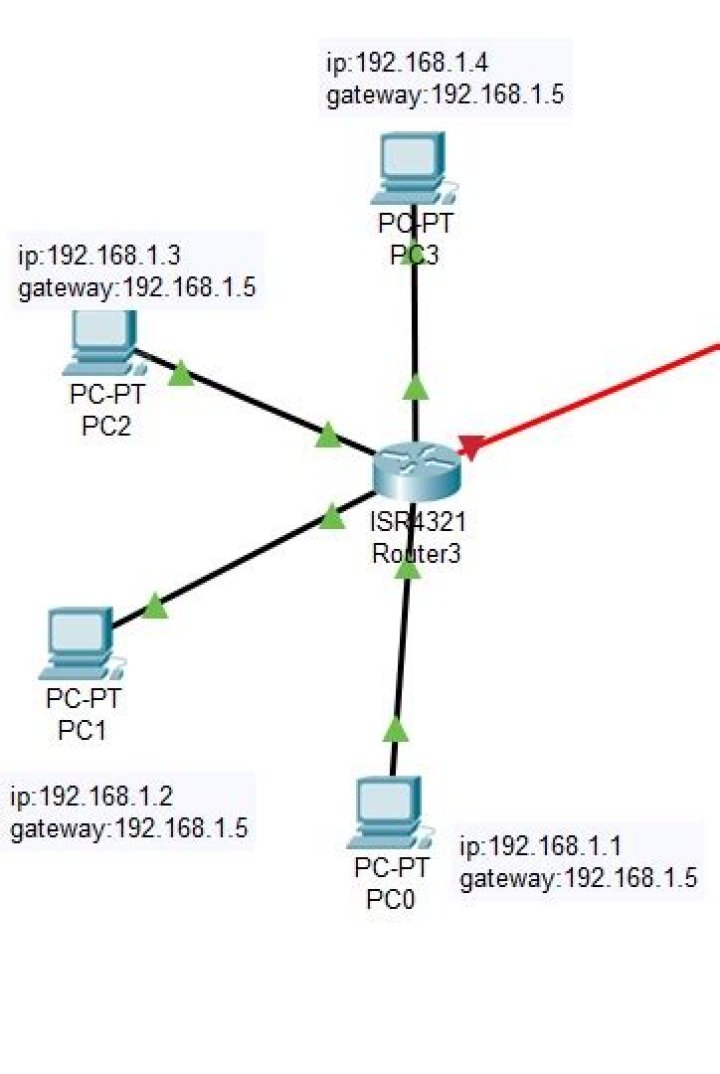
I am trying to connect 4 PCs via 4231router. I have used Copper Straight Through cable to connect PCs to the router. Since this router model contains only 2 GigabitEthernet ports, I have added the NIM-ES2-4 module to get 4 more GigabitEthernet ports. But while configuring the router, I am getting this error.

This is my layout:
I want to keep the layout the same with the same devices. Is it possible?
1 Answer
The NIM-ES2-4 provides 4 Layer 2 ports, not Layer 3 as stated from Cisco 4-Port and 8-Port Layer 2 Gigabit EtherSwitch Network Interface Module Configuration Guide for Cisco 4000 Series ISR
The following Cisco 4-Ports and 8-Ports Layer 2 Gigabit EtherSwitch Network Interface Modules are supported on the Cisco 4000 Series ISRs:
- 4-port non-POE Layer 2 Gigabit Ethernet Switch Network Interface Module (NIM-ES2-4)
- 8-port non-POE Layer 2 Gigabit Ethernet Switch Network Interface Module (NIM-ES2-8)
- 8-port POE Layer 2 Gigabit Ethernet Switch Network Interface Module (NIM-ES2-8-P)
That is why you can't directly assign an IP to the interface as it is not Layer 3. You might consider creating a vlan, set ip for the vlan, then setting interface gigabitethernet 0/2/3 as switchport access to use the vlan.
1



