
Everything works on my local machine but when pushing to GitLab my runner/pipeline is having issues.
Our build step definitely looks to be creating the database (I can connect from SQL Server Management Studio when launched as NT AUTHORITY\System). But for some reason the test project can't seem to connect;
System.Data.Entity.Core.EntityException : The underlying provider failed on Open. ----> System.Data.SqlClient.SqlException : Cannot open database "test_localdb" requested by the login. The login failed. Login failed for user 'NT AUTHORITY\SYSTEM'. Data: HelpLink.ProdName: Microsoft SQL Server HelpLink.EvtSrc: MSSQLServer HelpLink.EvtID: 4060 HelpLink.BaseHelpUrl: HelpLink.LinkId: 20476 at System.Data.Entity.Core.EntityClient.EntityConnection.Open() at System.Data.Entity.Core.Objects.ObjectContext.EnsureConnection(Boolean shouldMonitorTransactions) at System.Data.Entity.Core.Objects.ObjectContext.ExecuteInTransaction[T](Func`1 func, IDbExecutionStrategy executionStrategy, Boolean startLocalTransaction, Boolean releaseConnectionOnSuccess) at System.Data.Entity.Core.Objects.ObjectQuery`1.<>c__DisplayClass7.<GetResults>b__5() at System.Data.Entity.SqlServer.DefaultSqlExecutionStrategy.Execute[TResult](Func`1 operation) at System.Data.Entity.Core.Objects.ObjectQuery`1.GetResults(Nullable`1 forMergeOption) at System.Data.Entity.Core.Objects.ObjectQuery`1.<System.Collections.Generic.IEnumerable<T>.GetEnumerator>b__0() at System.Data.Entity.Internal.LazyEnumerator`1.MoveNext() at System.Linq.Enumerable.FirstOrDefault[TSource](IEnumerable`1 source) at System.Data.Entity.Core.Objects.ELinq.ObjectQueryProvider.<GetElementFunction>b__1[TResult](IEnumerable`1 sequence) at System.Data.Entity.Core.Objects.ELinq.ObjectQueryProvider.ExecuteSingle[TResult](IEnumerable`1 query, Expression queryRoot) at System.Data.Entity.Core.Objects.ELinq.ObjectQueryProvider.System.Linq.IQueryProvider.Execute[TResult](Expression expression) at System.Data.Entity.Internal.Linq.DbQueryProvider.Execute[TResult](Expression expression) at System.Linq.Queryable.FirstOrDefault[TSource](IQueryable`1 source) at ConsoleApp7.Program.GetRecordById(Int32 recordId) in C:\GitLab-Runner\builds\e4c3e954\0\tel\test_localdb\ConsoleApp7\Program.cs:line 18 at Tests.Class1.ShouldFindCustomer() in C:\GitLab-Runner\builds\e4c3e954\0\tel\test_localdb\Tests\Class1.cs:line 15 --SqlException at System.Data.SqlClient.SqlInternalConnectionTds..ctor(DbConnectionPoolIdentity identity, SqlConnectionString connectionOptions, SqlCredential credential, Object providerInfo, String newPassword, SecureString newSecurePassword, Boolean redirectedUserInstance, SqlConnectionString userConnectionOptions, SessionData reconnectSessionData, DbConnectionPool pool, String accessToken, Boolean applyTransientFaultHandling, SqlAuthenticationProviderManager sqlAuthProviderManager) at System.Data.SqlClient.SqlConnectionFactory.CreateConnection(DbConnectionOptions options, DbConnectionPoolKey poolKey, Object poolGroupProviderInfo, DbConnectionPool pool, DbConnection owningConnection, DbConnectionOptions userOptions) at System.Data.ProviderBase.DbConnectionFactory.CreateNonPooledConnection(DbConnection owningConnection, DbConnectionPoolGroup poolGroup, DbConnectionOptions userOptions) at System.Data.ProviderBase.DbConnectionFactory.TryGetConnection(DbConnection owningConnection, TaskCompletionSource`1 retry, DbConnectionOptions userOptions, DbConnectionInternal oldConnection, DbConnectionInternal& connection) at System.Data.ProviderBase.DbConnectionInternal.TryOpenConnectionInternal(DbConnection outerConnection, DbConnectionFactory connectionFactory, TaskCompletionSource`1 retry, DbConnectionOptions userOptions) at System.Data.ProviderBase.DbConnectionClosed.TryOpenConnection(DbConnection outerConnection, DbConnectionFactory connectionFactory, TaskCompletionSource`1 retry, DbConnectionOptions userOptions) at System.Data.SqlClient.SqlConnection.TryOpenInner(TaskCompletionSource`1 retry) at System.Data.SqlClient.SqlConnection.TryOpen(TaskCompletionSource`1 retry) at System.Data.SqlClient.SqlConnection.Open() at System.Data.Entity.Infrastructure.Interception.DbConnectionDispatcher.<Open>b__36(DbConnection t, DbConnectionInterceptionContext c) at System.Data.Entity.Infrastructure.Interception.InternalDispatcher`1.Dispatch[TTarget,TInterceptionContext](TTarget target, Action`2 operation, TInterceptionContext interceptionContext, Action`3 executing, Action`3 executed) at System.Data.Entity.Infrastructure.Interception.DbConnectionDispatcher.Open(DbConnection connection, DbInterceptionContext interceptionContext) at System.Data.Entity.Core.EntityClient.EntityConnection.<Open>b__2() at System.Data.Entity.SqlServer.DefaultSqlExecutionStrategy.<>c__DisplayClass1.<Execute>b__0() at System.Data.Entity.SqlServer.DefaultSqlExecutionStrategy.Execute[TResult](Func`1 operation) at System.Data.Entity.SqlServer.DefaultSqlExecutionStrategy.Execute(Action operation) at System.Data.Entity.Core.EntityClient.EntityConnection.Open() I have also tried to share the instance and can't connect when launching SSMS as a different using (even using the (localdb)\.\SharedName.
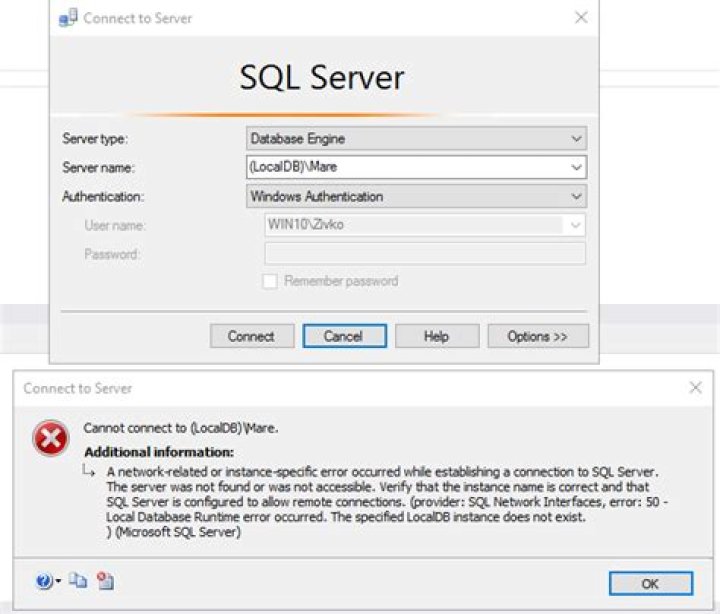
I have read a few similar questions about stopping/starting and recreating etc but to no avail. Connecting using the named pipe doesn't seem to help either.
Perhaps there is a better way to tackle this?
3Related questions 1 Connecting to LocalDB from Visual Studio Online Build Server 0 Connection not working with localdb in visual studios 1 Cannot connect to SQL LocalDB on Build Server Related questions 1 Connecting to LocalDB from Visual Studio Online Build Server 0 Connection not working with localdb in visual studios 1 Cannot connect to SQL LocalDB on Build Server 1 Unable to connect to LocalDB 5 SQL Server 2016 LocalDb connection issue 11 How do I connect to SQL Server 2017 LocalDB? 3 Unable to connect to VSTS LocalDB instance 0 Unable to connect to SQL Server 2016 LocalDB 0 .NET Core API cannot connect to MS LocalDB 1 Unable to connect LocalDB from Visual Studio 2019 Load 7 more related questions Show fewer related questions
Reset to default



