
I am doing the following inside a make file
pushd %dir_name% and i get the following error
/bin/sh : pushd : not found Can someone please tell me why this error is showing up ? I checked my $PATH variable and it contains /bin so I don't think that is causing a problem.
511 Answers
pushd is a bash enhancement to the POSIX-specified Bourne Shell. pushd cannot be easily implemented as a command, because the current working directory is a feature of a process that cannot be changed by child processes. (A hypothetical pushd command might do the chdir(2) call and then start a new shell, but ... it wouldn't be very usable.) pushd is a shell builtin, just like cd.
So, either change your script to start with #!/bin/bash or store the current working directory in a variable, do your work, then change back. Depends if you want a shell script that works on very reduced systems (say, a Debian build server) or if you're fine always requiring bash.
add
SHELL := /bin/bash
at the top of your makefile I have found it on another question How can I use Bash syntax in Makefile targets?
1A workaround for this would be to have a variable get the current working directory. Then you can cd out of it to do whatever, then when you need it, you can cd back in.
i.e.
oldpath=`pwd` #do whatever your script does ... ... ... # go back to the dir you wanted to pushd cd $oldpath2
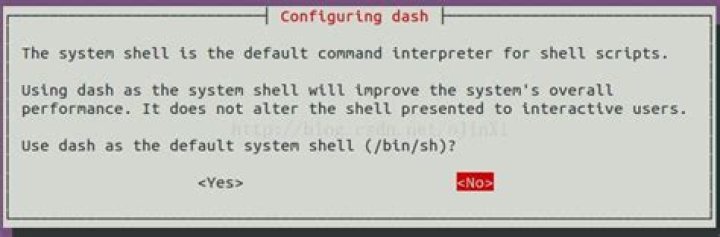
sudo dpkg-reconfigure dash Then select no.
This is because pushd is a builtin function in bash. So it is not related to the PATH variable and also it is not supported by /bin/sh (which is used by default by make. You can change that by setting SHELL (although it will not work directly (test1)).
You can instead run all the commands through bash -c "...". That will make the commands, including pushd/popd, run in a bash environment (test2).
SHELL = /bin/bash test1: @echo before @pwd @pushd /tmp @echo in /tmp @pwd @popd @echo after @pwd test2: @/bin/bash -c "echo before;\ pwd; \ pushd /tmp; \ echo in /tmp; \ pwd; \ popd; \ echo after; \ pwd;" When running make test1 and make test2 it gives the following:
prompt>make test1 before /download/2011/03_mar make: pushd: Command not found make: *** [test1] Error 127 prompt>make test2 before /download/2011/03_mar /tmp /download/2011/03_mar in /tmp /tmp /download/2011/03_mar after /download/2011/03_mar prompt> For test1, even though bash is used as a shell, each command/line in the rule is run by itself, so the pushd command is run in a different shell than the popd.
4This ought to do the trick:
( cd dirname ; pwd ); pwd The parentheses start a new child shell, thus the cd changes the directory within the child only, and any command after it within the parentheses will run in that folder. Once you exit the parentheses you are back in wherever you were before..
Your shell (/bin/sh) is trying to find 'pushd'. But it can't find it because 'pushd','popd' and other commands like that are build in bash.
Launch you script using Bash (/bin/bash) instead of Sh like you are doing now, and it will work
here is a method to point
sh -> bash
run this command on terminal
sudo dpkg-reconfigure dash After this you should see
ls -l /bin/sh point to /bin/bash (and not to /bin/dash)
Synthesizing from the other responses: pushd is bash-specific and you are make is using another POSIX shell. There is a simple workaround to use separate shell for the part that needs different directory, so just try changing it to:
test -z gen || mkdir -p gen \ && ( cd $(CURRENT_DIRECTORY)/genscript > /dev/null \ && perl genmakefile.pl \ && mv Makefile ../gen/ ) \ && echo "" > $(CURRENT_DIRECTORY)/gen/SvcGenLog (I substituted the long path with a variable expansion. I probably is one in the makefile and it clearly expands to the current directory).
Since you are running it from make, I would probably replace the test with a make rule, too. Just
gen/SvcGenLog : mkdir -p gen cd genscript > /dev/null \ && perl genmakefile.pl \ && mv Makefile ../gen/ \ echo "" > gen/SvcGenLog (dropped the current directory prefix; you were using relative path at some points anyway) And than just make the rule depend on gen/SvcGenLog. It would be a bit more readable and you can make it depend on the genscript/genmakefile.pl too, so the Makefile in gen will be regenerated if you modify the script. Of course if anything else affects the content of the Makefile, you can make the rule depend on that too.
Note that each line executed by a make file is run in its own shell anyway. If you change directory, it won't affect subsequent lines. So you probably have little use for pushd and popd, your problem is more the opposite, that of getting the directory to stay changed for as long as you need it!
Run "apt install bash" It will install everything you need and the command will work




