
I'm having some trouble deploying Dell Command Update software for my users using InTune. I downloaded the most recent version of Dell Command Update(Dell-Command-Update-Application_HYR95_WIN_5.0.0_A00.EXE) and have it stored in a folder "C:\Dell Command Update". In the same folder, I have a PS script that would set "Dell Client Management Service" enabled and running, then install the Dell Command Update software. I also have a "MySettings.xml" file that will also force overwrite the default "MySettings.xml" on all machines. All this is done as Administrator.
In the "C:\Dell Command Update" folder, I have:
- "Dell-Command-Update-Application_HYR95_WIN_5.0.0_A00.EXE" file
- "MySettings.xml" file
- PS Script to run and install the package.
I also have the "DellCommandUpdate.msi" file stored in the same folder, but not used in this process.
Using Microsoft Win32 Content Prep tool to create an intunewin file, I would have the source folder as "C:\Dell Command Update", the setup file as "Dell-Command-Update-Application_HYR95_WIN_5.0.0_A00.EXE", and the output as "C:\Dell Command Update".
The issue I'm having is the package won't install successfully on all machines. It will turn on "Dell Client Management Service" but won't install Dell Command Update.
Here is the script:
Push-Location # Set Variables $DellCommandPath = "C:\Program Files (x86)\Dell\CommandUpdate" # Start Logging $PackageName = "Dell-Command-Update" $PathLocal = "$Env:Programfiles\MDM" Start-Transcript -Path "$PathLocal\Log\$PackageName-install.log" -Force #Start and run Dell Client Management Service $ServiceName = "DellClientManagementService" Set-Service -Name $ServiceName -StartupType Automatic -Status Running try { # Create Temp folder New-Item -ItemType Directory -Path "$PathLocal\Temp\$PackageName" -Force # Install Latest Dell Command Update Start-Process "Dell-Command-Update-Application_HYR95_WIN_5.0.0_A00.exe" -ArgumentList "/s" -Wait # Import Config - Force Overwrite of Existing Settings XML Copy-Item -Path "DellCommandMySettings.xml" -Destination "$PathLocal\Temp\$PackageName" -Force Set-Location -Path "$DellCommandPath" ./dcu-cli.exe /configure -importSettings="$PathLocal\Temp\$PackageName\DellCommandMySettings.xml" # Disable Initial Welcome Screen if (Test-Path -Path "HKLM:\SOFTWARE\Dell\UpdateService\Clients\CommandUpdate\Preferences\CFG") { [void](New-ItemProperty -Path "HKLM:\SOFTWARE\Dell\UpdateService\Clients\CommandUpdate\Preferences\CFG" -Name "ShowSetupPopup" -Value 0 -PropertyType DWord -Force) } } catch { Write-Error $_ } Stop-Transcript Pop-Location Any help or advice is greatly appreciated!
Thank you!
I would create a Win32 app in Intune and deploy the package to test machines. One machine will have "Dell Client Management Service" enabled and running, but won't install Dell Command Update and another machine will just fail upon deployment.
1 Answer
First post, but figured I'd try to help out here.
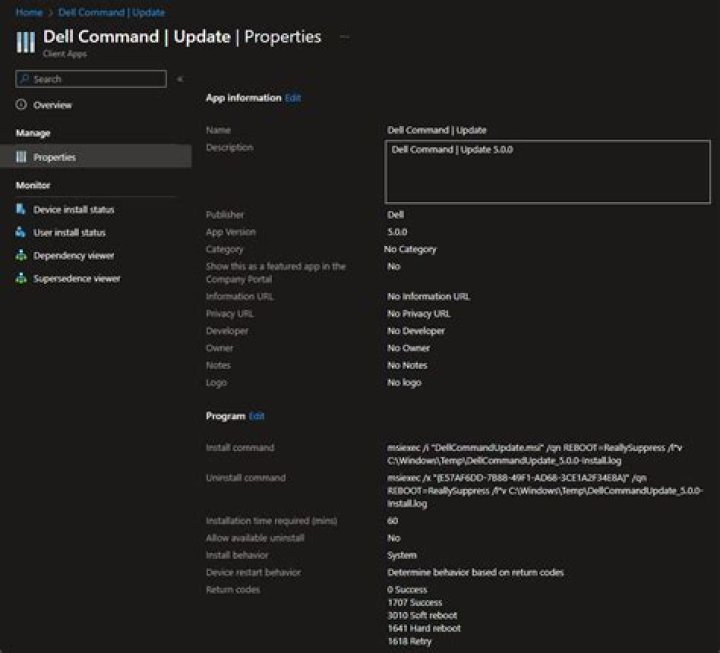
Unfortunately, I've been back and forth on how I deploy Dell Command | Update, as the dev's with Dell (for lack of terms) suck and are inconsistent. This time around, I was able to extract the MSI (using the following process HERE) and package it using the IntuneWinAppUtil. After importing it to Intune, it immediately went out and upgraded my Dell machines in my test tenant. Here's the settings I used to deploy things:
I hope this helps!




