I am trying to add rows for search/filter requirement. There are 100s of fields to filter. Do my boss decided to keep them in a dropdown (here in this example I kept Manager, City and Name). When user selects one from the drop down, (lets say, City), the next box should display another drop down with all cities. If user selects Name, the next box should display a Text Box. And user can add as many rows (filters).
I tried and was able to dynamic add rows and display text box or drop down (based on inputType). But my problem is when I change from manager to Name, then it changes all boxes in right side to Text box. And when Add a new row/filer, it automatically displays previous selected drop down or Test. That means what I want is the right side dropdown or text box should appear only when user selects a value from the left side.
I am not sure I am explaining it well or not. But please feel free to ask questions.
Below is the example I have done so far. Thanks in advance for your help! 
[AFTER MAKING CHANGES AS PER BELOW ANSWER] Thanks to @Nick Felker for quick answer.
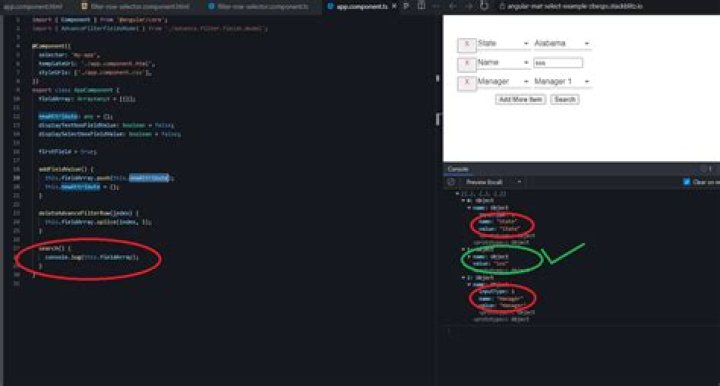
Now I am able to add and delete rows. I want o get the key/value pair in JSON format. I am getting. but not getting the selected values fro the drop down fields. I am adding a new image and new stackblitz
Any help please.
 New Stackblitz after below answer
1 Answer
What I would do is split up the filtering into individual filter-row-selector components. That way each selector itself won't affect the others. I think this demo is closer to what you want:
filter-row-selector.component.ts
import { AdvanceFilterFieldsModel } from '../advance.filter.fields.model'; import { Component, OnInit, Input } from '@angular/core'; @Component({ selector: 'filter-row-selector', templateUrl: './filter-row-selector.component.html', styleUrls: ['./filter-row-selector.component.css'], }) export class FilterRowSelectorComponent implements OnInit { @Input('field') field: any; advanceFilterFieldsModel: AdvanceFilterFieldsModel[] = [ { name: 'Manager', value: 'Manager', inputType: 1 }, { name: 'State', value: 'State', inputType: 1 }, { name: 'Name', value: 'Name', inputType: 2 }, ]; filterPlaceHolerArray: Array<any> = [{}]; managerArray: Array<any> = [ { name: 'Manager 1', value: 'Manager1' }, { name: 'Manager 2', value: 'Manager2' }, { name: 'Manager 3', value: 'Manager3' }, ]; stateArray: Array<any> = [ { name: 'Alabama', value: 'AL' }, { name: 'Alaska', value: 'AA' }, { name: 'Florida', value: 'FL' }, ]; displayTextboxFieldValue: boolean = false; displaySelectboxFieldValue: boolean = false; constructor() {} ngOnInit() {} populateFieldValue(value: any) { console.log(value); if (value.name == 'Manager') { this.filterPlaceHolerArray = this.managerArray; } else if (value.name == 'State') { this.filterPlaceHolerArray = this.stateArray; } if (value.inputType == 1) { this.displaySelectboxFieldValue = true; this.displayTextboxFieldValue = false; } else if (value.inputType == 2) { this.displayTextboxFieldValue = true; this.displaySelectboxFieldValue = false; } } } filter-row-selector.component.html
<td> <div> <div> <div (click)="deleteFieldValue(i)"> <i></i> </div> </div> <mat-select (valueChange)="populateFieldValue($event)" [(ngModel)]="field.name" placeholder="Select" appearance="outline" > <mat-option *ngFor="let filterField of advanceFilterFieldsModel" [value]="filterField" > {{ filterField.name }} </mat-option> </mat-select> </div> </td> <td> <input *ngIf="displayTextboxFieldValue" [(ngModel)]="field.value" type="text" name="{{ fieldName }}" placeholder="{{ fieldName }}" /> <mat-select *ngIf="displaySelectboxFieldValue" placeholder="Select" appearance="outline" > <mat-option *ngFor="let filterPlaceHoler of filterPlaceHolerArray" [value]="filterPlaceHoler" > {{ filterPlaceHoler.name }} </mat-option> </mat-select> </td> 



