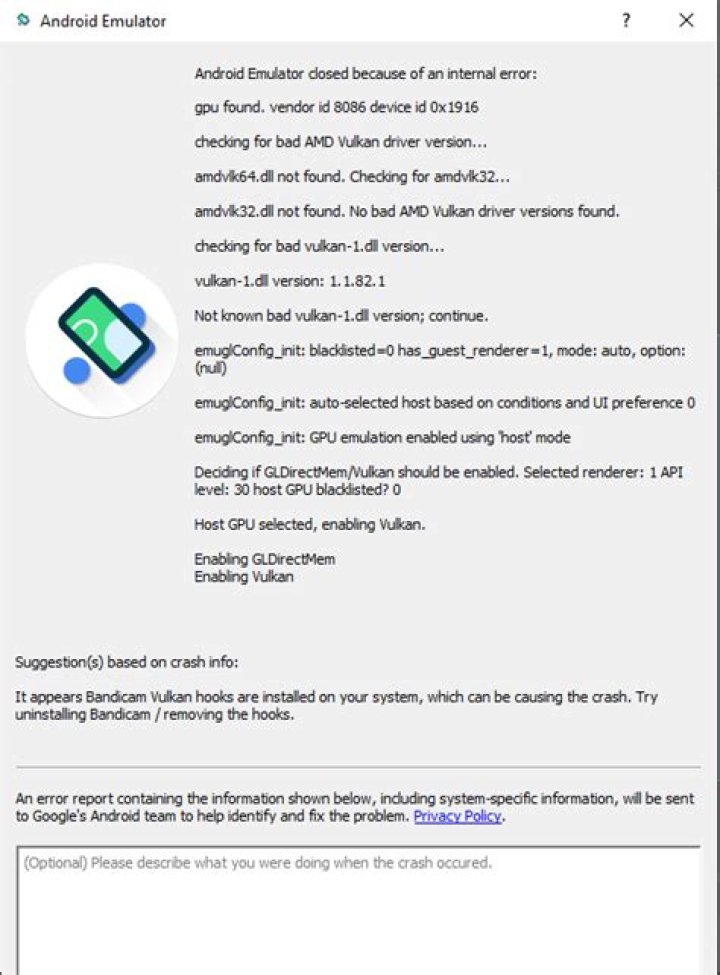

I installed Android Emulator and Google Play Intel x86 Atom System Image (API 28) and configured a AVD, then ran it for first time. The emulator window showed and closed immediately and in Event Log, I see this error:
5:48 PM Emulator: deleteSnapshot: for default_boot 5:48 PM Emulator: Process finished with exit code 0 This error occurs in both Cold and Quick Boot.
- I already installed the
Intel x86 Emulator Accelerator (HAXM). - I currently use
Android Studio 3.1.4. - I tried using
Wipe Dataand recreating theAVD, but nothing became affected.
What's wrong and how to fix this problem?
5 Answers
Actualy I got similar error often:
`16:22 Emulator: D:\Data\Sdk\Android\emulator\qemu\windows-x86_64\qemu-system-x86_64.exe: error while loading state for instance 0x0 of device 'goldfish_pipe'
16:22 Emulator: deleteSnapshot: for default_boot
16:22 Emulator: qemu: unsupported keyboard cmd=0x84
16:22 Emulator: Process finished with exit code 0`
I figured out it is good to make snapshot when you install new device(like google account etc.)
When the error occurrs again, then you need to edit device, Show advanced settings and select Boot from snapshot.
Dude I was having the same problem and solved doing the following:
I accessed Android Studio, went to the list of my AVDs and wiped the data with the "Wipe Data" function.
After that it went back to normal operation.
Hope this helps! = D
I think the problem was with my CPU. So I used Genymotion (that uses VirtualBox), it's much faster than AVD. I repeat it's very FAST. Now, I'm using Android 9 (Pie) on Genymotion.
I recommend Genymotion for those who have problems with AVD.
If there is unused AVD's remove them,then Try to increase RAM size of the emulator and restart your android studio.
1In my case Avast was the cause of the problem, I'm solve it deactivating avast's shields for 10 minutes, run the emulator (It runs well again but deleted all the previous apps installed), closed it, close android studio, reactivate the Avast's shield again and run android studio and the emulator works fine again now.




