
I have a DLL where I use AllocConsole() and cout to display data for debugging purposes.
It used to work fine but since I updated my compiler (Visual Studio 2012) to the latest the dll just shows the console but not the prints/couts.
I am out of idea's as to why this is happening.
Any idea's?
Part of my code
__declspec(dllexport) INT APIENTRY DllMain(HMODULE hDLL, DWORD Reason, LPVOID Reserved) { switch(Reason) { case DLL_PROCESS_ATTACH: AllocConsole(); DisableThreadLibraryCalls(hDLL); // DetourTransactionBegin(); DetourUpdateThread(GetCurrentThread()); DetourAttach(&(PVOID&)pSend, MySend); if(DetourTransactionCommit() == NO_ERROR) cout << "[" << MySend << "] successfully detoured." << endl; But nothing gets displayed.
3 Answers
I vaguely recall that you might need to redirect the stdout to the console. I might be wrong though (since you had your code working earlier):
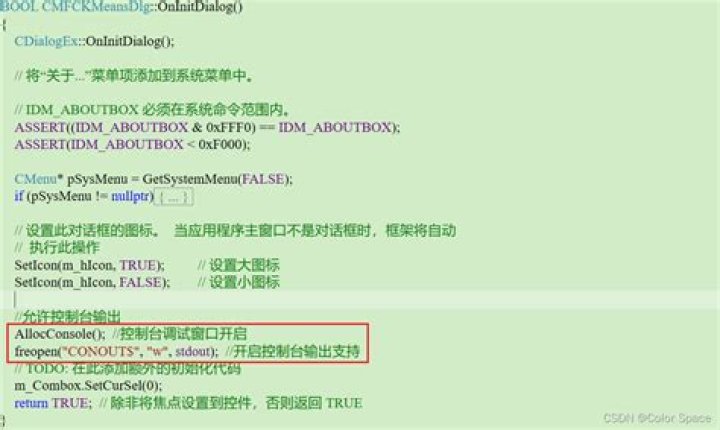
AllocConsole(); freopen("CONOUT$", "w", stdout); std::cout << "This works" << std::endl; After allocating a new console via AllocConsole(), you need to re-open the standard streams (stdout, stderr, stdin) before you can use them.
You can do so by using freopen (in newer versions of Visual Studio you need to use freopen_s) Example:
FILE *fDummy; freopen_s(&fDummy, "CONIN$", "r", stdin); freopen_s(&fDummy, "CONOUT$", "w", stderr); freopen_s(&fDummy, "CONOUT$", "w", stdout); If you want to use the deprecated freopen you can disable the warning by #defineing _CRT_SECURE_NO_WARNINGS.
If you also want to use the wide-character streams (std::wcout, std::wcerr, etc...), you need to call SetStdHandle() to set a new output handle for your process. You can get the required file handle for this by calling CreateFile() with CONOUT$ / CONIN$ as file name:
HANDLE hConOut = CreateFile(_T("CONOUT$"), GENERIC_READ | GENERIC_WRITE, FILE_SHARE_READ | FILE_SHARE_WRITE, NULL, OPEN_EXISTING, FILE_ATTRIBUTE_NORMAL, NULL); SetStdHandle(STD_OUTPUT_HANDLE, hConOut); Additionally, if you tried to use one of the streams before re-opening them, they will have the std::ios_base::badbit and std::ios_base::failbit set in their iostate, so subsequent writes / reads will be ignored.
You can reset the stream state with .clear(), after which you can read/write from/to the stream again:
std::cout.clear(); std::cin.clear(); Heres a full example of re-opening all the streams after AllocConsole():
void CreateConsole() { if (!AllocConsole()) { // Add some error handling here. // You can call GetLastError() to get more info about the error. return; } // std::cout, std::clog, std::cerr, std::cin FILE* fDummy; freopen_s(&fDummy, "CONOUT$", "w", stdout); freopen_s(&fDummy, "CONOUT$", "w", stderr); freopen_s(&fDummy, "CONIN$", "r", stdin); std::cout.clear(); std::clog.clear(); std::cerr.clear(); std::cin.clear(); // std::wcout, std::wclog, std::wcerr, std::wcin HANDLE hConOut = CreateFile(_T("CONOUT$"), GENERIC_READ | GENERIC_WRITE, FILE_SHARE_READ | FILE_SHARE_WRITE, NULL, OPEN_EXISTING, FILE_ATTRIBUTE_NORMAL, NULL); HANDLE hConIn = CreateFile(_T("CONIN$"), GENERIC_READ | GENERIC_WRITE, FILE_SHARE_READ | FILE_SHARE_WRITE, NULL, OPEN_EXISTING, FILE_ATTRIBUTE_NORMAL, NULL); SetStdHandle(STD_OUTPUT_HANDLE, hConOut); SetStdHandle(STD_ERROR_HANDLE, hConOut); SetStdHandle(STD_INPUT_HANDLE, hConIn); std::wcout.clear(); std::wclog.clear(); std::wcerr.clear(); std::wcin.clear(); } This works using vs2015 with the line std::cout.clear()
if (!AllocConsole()) MessageBox(NULL, L"The console window was not created", NULL, MB_ICONEXCLAMATION); FILE* fp; freopen_s(&fp, "CONOUT$", "w", stdout); printf("Hello console on\n"); std::cout.clear(); std::cout << "Cout line one." << std::endl; cout << "Cout line two." << std::endl; MessageBox(NULL, (L"Pause to see console output."), (L"Pause Here"), MB_OK | MB_SYSTEMMODAL | MB_ICONEXCLAMATION); fclose(fp); if (!FreeConsole()) MessageBox(NULL, L"Failed to free the console!", NULL, MB_ICONEXCLAMATION); 



