
We are receiving the following error in the Event Viewer > System events list. How can we resolve it?
<Event xmlns=""> <System> <Provider Name="Ntfs" Guid="{DD70BC80-EF44-421B-8AC3-CD31DA613A4E}" /> <EventID>55</EventID> <Version>0</Version> <Level>2</Level> <Task>0</Task> <Opcode>0</Opcode> <Keywords>0x8000000000000000</Keywords> <TimeCreated SystemTime="2016-01-07T22:20:31.481368800Z" /> <EventRecordID>265954</EventRecordID> <Correlation /> <Execution ProcessID="4" ThreadID="216" /> <Channel>System</Channel> <Computer>Owner-PC</Computer> <Security UserID="S-1-5-18" /> </System> <EventData> <Data Name="DriveName">D:</Data> <Data Name="DeviceName" /> <Data Name="CorruptionState">0x0</Data> <Data Name="HeaderFlags">0x922</Data> <Data Name="Severity">Critical</Data> <Data Name="Origin">File System Driver</Data> <Data Name="Verb">Bad FRS</Data> <Data Name="Description"> The Master File Table (MFT) contains a corrupted file record. The file reference number is 0x1000000000000. The name of the file is "<unable to determine file name>". </Data> <Data Name="Signature">0xd070231a</Data> <Data Name="Outcome">Spot Verifier Bypassed On Critical</Data> <Data Name="SampleLength">0</Data> <Data Name="SampleData" /> <Data Name="SourceFile">0x1</Data> <Data Name="SourceLine">868</Data> <Data Name="SourceTag">199</Data> <Data Name="CallStack"> NTFS+0x156ec, NTFS+0xd44b1, NTFS+0x1080d5, NTFS+0xf313d, NTFS+0x1d5e0, ntoskrnl+0x79dd9, ntoskrnl+0xe7758, ntoskrnl+0x1545b6 </Data> </EventData> </Event> What have we tried?
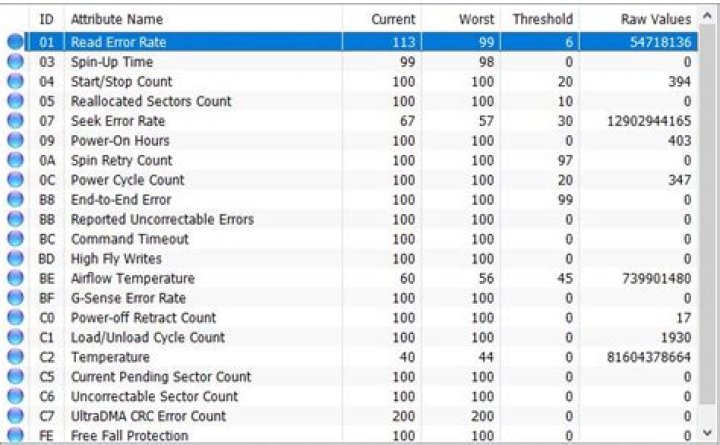
Basic SMART
> wmic wmic:root\cli> diskdrive get status Status OK OK Check NTFS
>chkntfs D: Cannot query state of drive D: Check Disk
>chkdsk /r D: The type of the file system is NTFS. Volume label is Data. Stage 1: Examining basic file system structure ...
Deleting corrupt attribute record (128, "") from file record segment 0. 18432 file records processed. File verification completed. 0 large file records processed. 0 bad file records processed. Stage 2: Examining file name linkage ...
Deleting index entry B52E4F3-E870-4CF0-95DE-BC84F8721C11} in index $I30 of file 3220. Deleting index entry 61D8746-7DE9-4160-AA8C-712F086F1D13} in index $I30 of file 3224. Deleting index entry 34ABE3C-99F7-4A32-A0B1-0A4F8ECA4CB1} in index $I30 of file 3226. Deleting index entry 6C074EF-EC95-47FC-A873-E79AC5BFFD80} in index $I30 of file 3226. Deleting index entry 6C7D634-34EE-402E-A6F9-C86809B35313} in index $I30 of file 3226. Deleting index entry 5E7DBB4-CDB5-42F9-B99B-78A05A5933CE} in index $I30 of file 3230. Deleting index entry E58B84A-F827-49D7-82BD-DEA0621246BE} in index $I30 of file 3238. Deleting index entry 76BD55E-43F6-4A50-878D-EF6CA6AA8090} in index $I30 of file 3241. Deleting index entry 8597F17-F5F5-4798-BA94-DCCD02AD0F2F} in index $I30 of file 3243. Deleting index entry 588F616-0C9B-450B-A3AD-B26E26BDB3E3} in index $I30 of file 3245. Deleting index entry 5E6C666-0D25-4A4F-971E-DEE25265C838} in index $I30 of file 3256. Deleting index entry 57BC54D-5DAB-462C-AC42-53E6A736BF19} in index $I30 of file 3266. 18610 index entries processed. Index verification completed. 0 unindexed files scanned. 0 unindexed files recovered to lost and found. Stage 3: Examining security descriptors ...
Security descriptor verification completed. Inserting data attribute into file 0. 91 data files processed. CHKDSK is verifying Usn Journal... Usn Journal verification completed. Stage 4: Looking for bad clusters in user file data ...
18416 files processed. File data verification completed. Stage 5: Looking for bad, free clusters ...
Progress: 11010064 of 442093830 done; Stage: 2%; Total: 3%; ETA: 3:06:48 ... 



